2011-10-28

Third Gen System 76 Lemur Laptop Goes on Sale


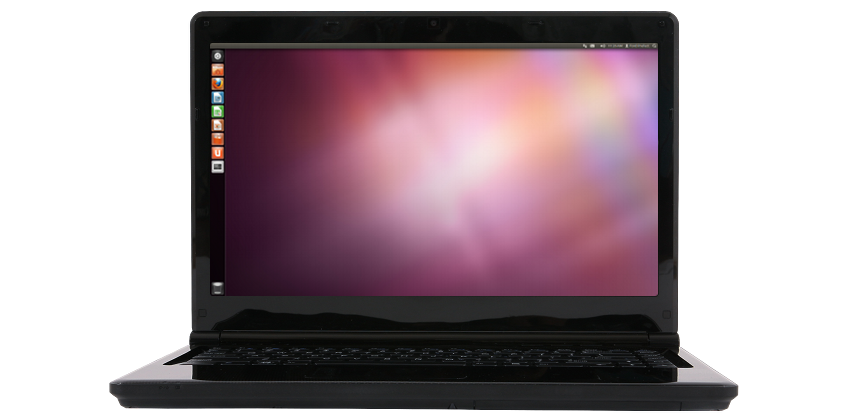
The third generation model in Ubuntu-dedicated hardware company System 76′s Lemur Ultra laptop line is available to buy.

c="http://cdn.omgubuntu.co.uk/wp-content/uploads/2011/10/lemur-ec93d28b0c74b35-500x247.png" alt="The New Lemur Laptop" width="500" height="247" />

The 14.1″ portable starts at $599 for the base configuration, which sports a more powerful Intel i5 CPU clocked at 2.4Ghz than its predecessor (whose base system ran with an Intel  i3 @ 1.2Ghz); a bumped-up 720p HD-friendly graphics chip, but the same 2GB of DDR3 RAM and lacklustre 250GB HDD spinning at 5400 RPM as found in the previous model.

The good news is that Ubuntu 11.10 64bit is installed by default, meaning you won’t need to faff around upgrading should you choose to buy one the Lemur.


As with most System 76 devices, users are free to customise configurations based on their needs – including faster i5 and i7 CPUs, additional RAM, longer-lasting batteries and a slew of HDD and SSD sizes – but this does add to the overall cost.

System 76 | Lemur Ultra 

Thanks to James


Source

It’s ‘Game Over’ for Linux. Apparently.


Unlike trains or buses you can pretty much bank on predictions of Linux’s impending doom, demise and decay arriving almost to schedule. 

Coming barely a day after the release of the latest linux kernel, Mike Gualtieri of technology research group Forrester has declared that it’s “game over” for Linux‘s plan of worldwide domination.

"It struggled so hard to dominate the world.” he writes in a blog post assertively titled Mobile Proliferation Killed Linux Hopes For World Domination. “It was the little open source engine that could, but it didn't."

He cites the well-trodden sub-2% stat as evidence of its failure, compounded, he argues, by the arrival and subsequent dominance of mobile platforms such as iOS and Android.

Now, we all know that Linux is just a kernel, and that Ubuntu, for example, is an operating system built around it.

Last time I checked that was true of Android, too.

But, just to really demonstrate the noble art of trolling, Gualtieri goes on to state: -

 " Open source never seems to be the innovator. Instead, it seems to disrupt pricing power for established technologies."

Shall I?


Source

‘My Weather Indicator’ Adds Geolocation Support


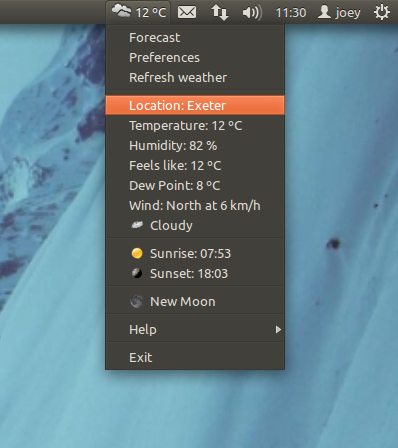
Panel-based weather applet My Weather Indicator has added geolocation support, providing input free location detection based on your IP.

With many of us used to mobile apps and online weather sites using of geolocation to serve up weather info based on our country or county the idea of having to manually search for then enter my location into a weather app feels, well, a bit old hat.

So, in trying to keep up with the times, the latest version of panel-based weather reporting applet ‘My Weather Indicator‘ has added in IP-based geo-location detection.

My Weather Indicator in Ubuntu 11.10

Not perfect


As stoked as I am to see geolocation used I have to admit that it’s not perfect, at least not yet.

I live in Exeter, UK but My Weather Indicator deduced my location as Bristol, UK – some 80 miles away.

Thankfully the Indicator retains the ability to manually enter/search for your location, so it only took a couple of seconds to set things right.

It would be interesting to see if other application settings could be adjusted depending on locale – for example here in the UK we typically display wind speeds in ‘Mph’ rather than the default settings of ‘Km/h’.

Install


The latest My Weather Indicator can be installed in Ubuntu 11.10 by adding the 'Atareao' PPA to your Software Sources.

ppa:atareao/atareao

After doing this just update and install 'My Weather Indicator' (not the similarly named indicator-weather) from the Ubuntu Software Centre.

Via atareao.es (Spanish)


Source

In-Store Ubuntu Displays, PCs Come to China


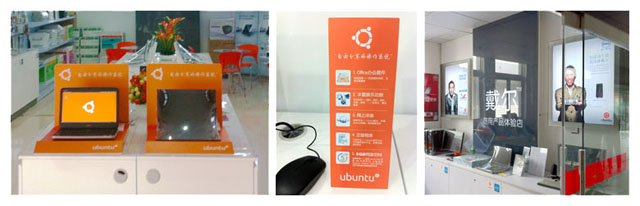
Imagine walking into a PC store and being greeted by a large Ubuntu-branded display with a host of Ubuntu-powered devices for sale.

Well, if you’re a PC-seeking shopper in China you’ll have over ample opportunity to see just such a display, as n-china/" onclick="javascript:_gaq.push(['_trackEvent','outbound-article','http://blog.canonical.com']);" target="_blank">Canonical’s new retail partnership with Dell puts Ubuntu-powered machines in over 200 stores across the country.

Beijing store Ubuntu display

This partnership sees Ubuntu pre-installed on a range of Dell computers, and backed up by colourful and informative in-store marketing. Staff will be trained in the advantages of Ubuntu so that shoppers are given helpful and accurate information about Ubuntu and what it offers.

If you’re going to try and reach your goal of 200 million Ubuntu users by 2015 then promoting Ubuntu in a country of 1.3 Billion isn’t a bad place to start, is it?


Source

Ubuntu 12.04 Development update


(This is a guest post from Ubuntu developer and Canonical employee Daniel Holbach, which was originally posted here.)

Ubuntu Development Update


Wow, one week into the release cycle and already and by the time of writing, we had 921 uploads to precise coming in already. This is very exciting, because a bunch of things are happening at the same time:
  • new features and bug fixes are brought in from Upstream (including Debian)
  • the delta between Ubuntu and Debian is reduced
  • many of the fixes in precise will result in stable release updates (SRUs) for oneiric

81 people already got their contributions into Ubuntu (in form of uploads) and there are going to be many many more.

So what’s exactly happening right now?

Ubuntu Developers are currently going through a long list of packages that received updates and changes during the last cycle and check which new releases were put out, both in Debian and other Upstream projects. Luckily for Debian, we have a tool called merge-o-matic, which spits out a list of differences between Ubuntu and Debian, which make it easier to spot, if changes in Ubuntu can simply be discarded (this is what we want – the closer to Debian and Upstream, the better), and where we might have to merge changes. This is also a great opportunity to make sure that those changes are forwarded to Debian and Upstream, so they can get included there. Some of these merges can be quite hairy, others are easier. The packaging guide has an article about merging, in case you are interested and have played around with Ubuntu development tools already.

The other thing that is happening is obviously the planning of the Ubuntu Developer Summit. Next week a lot of people are going to be in sessions at UDS to discuss all kinds of feature work in and around Ubuntu. Make sure you participate remotely, if you are interested, not at UDS and have time.

A few people have blogged about their plans and ideas for the next cycle already. Colin Watson, who is in charge of big parts of the foundations of Ubuntu, particularly the installer, mentions work in the image building pipeline and the general maintenance of the development release. Daniel Holbach (your friendly editor of this post) blogged about his ideas about opportunities for new developers to join the project.

You can also check the time-line of new blueprints for UDS being registered, and subscribe to them to be notified of changes.

Events


Ubuntu Community Appreciation Day
This year we are going to have the first ever Ubuntu Community Appreciation Day. The goal of this is obvious: take the time to thank somebody who put a lot of effort into Ubuntu to make it shine. Tell your friends and participate!

Ubuntu Developer Summit
UDS is kicking off on 31st October in sunny Florida. This is where all the plans for 12.04 are going to be discussed and long lists of work items are written. Check out Stefano Rivera’s list of specification blueprints that were last registered to get an idea what’s going to get discussed.

Spotlight: The Ubuntu Security Team


Yesterday I had a brief chat with Jamie Strandboge about the security team and their plans for precise. During the release of 11.10 the team put a lot of measures in place to help contributors to Ubuntu’s security world more effectively.

A good question is obviously: What does the team do to make Ubuntu more secure?

The work of the team falls into different categories. Of course a lot of the default choices have a great impact already (no open ports, etc.), also a lot of work went into making sure that all Ubuntu packages are built with the best security capabilities of our toolchain, other feature work like AppArmor and the Uncomplicated Firewall also help.

Then there is this massive amount of work reacting to published security fixes. For all of Ubuntu’s releases we have to make sure that the security fixes are integrated as quickly as possible, without the risk of regressions. (And this is an area you can easily get involved yourself, more on that in a bit.)

To cope with this Jamie’s team rotates roles in the team on a weekly basis, so somebody is always there to work on getting security fixes published, somebody else to help with reviewing changes and so on.

In the last cycle the documentation and tools were improved, so if you want to get involved, everything’s ready for you already. The security team updates this list of highlighted packages every week. You can also join the weekly meeting to get up to speed on what’s happening and get to introduce yourself.

If you think about it for a minute: is there a better way to contribute to Ubuntu than improving security for millions of users out there?

Get to know Jamie and his team: they are a very friendly bunch!

Get Involved

  1. Read the Introduction to Ubuntu Development. It’s a short article which will help you understand how Ubuntu is put together, how the infrastructure is used and how we interact with other projects.
  2. Follow the instructions in the Getting Set Up article. A few simple commands, a registration at Launchpad and you should have all the tools you need, and you’re ready to go.
  3. Check out our instructions for how to fix a bug in Ubuntu, they come with small examples that make it easier to visualise what exactly you need to do.

Find something to work on


Pick a bitesize bug. These are the bugs we think should be easy to fix. Another option is to help out in one of our initiatives.

In addition to that there are loads more opportunities over at Harvest.

Getting in touch


There are many different ways to contact Ubuntu developers and get your questions answered.
  • Be interactive and reach us most immediately: talk to us in #ubuntu-motu on irc.freenode.net.
  • Follow mailing lists and get involved in the discussions: ubuntu-devel-announce (announce only, low traffic), ubuntu-devel (high-level discussions), ubuntu-devel-discuss (fairly general developer discussions).
  • Stay up to date and follow the ubuntudev account on Facebook, Identi.ca or Twitter.


Source

Seif Needs Your Help To Gather Some Statistics On Gedit


I am working on a dashboard (start page) for Gedit to make it easier for users to see their most commonly used files.

My initial idea looks something like this:

ekyogre.com']);">(The thumbnails will view some parts of the content of the file.)

We are not sure that for Gedit that “Frequent” is of interest for us, however before we take any decisions we decided to appeal to all gedit users who have been using Zeitgeist for over a month to run the following script in a terminal by typing:

python usage.py

and paste the results as a comment on this post. Help us make gedit more awesome!

Here’s the download link for the script again:

Download Gedit Usage Script

Thanks!


Source

Ubuntu 11.10 at ARM TechCon 2011 [Video]


Canonical are putting a lot of effort into Ubuntu on ARM, and based on the small glimpses seen at this years ARM TechCon in California it’s effort that’s paying off. 

The awesome Charbax from cle','http://ARMDevices.net']);" target="_blank">ARMDevices.net was at the event and, as dependable as ever, he caught up with Canonical at their event booth to see what’s what and what will be.

In his video snapshot, embedded below, you can listen to Canonical discuss their push into Ubuntu Server for ARM (which Canonical are hoping is going to be huge); get a brief summary of ARM plans for 12.04; and, perhaps most importantly, have a good ol’ fashioned gawp at Ubuntu 11.10 running on a variety of ARM devices…


Thanks to Hendrik

No related posts.


Source

Nifty ‘Tea Timer’ Unity Applet Gets Updated


Kettle’s on! Pizza’s in the oven! Only 23 minutes until a new episode of ['_trackEvent','outbound-article','http://www.youtube.com']);" target="_blank">Inspector Spacetime – all are situations where keeping an eye on the time is important.

Now hopefully you’re not like me (i.e. useless at doing so) but, should you be, then TeaTime is a neat Unity-launcher based alarm applet that works wonders.

Better yet, it has recently been updated with Ubuntu 11.10 support, and an audible alert that will keep on ringing until click on the alarm launcher.

Tea Timer applet in use in Ubuntu 11.10

Sure, the user-base for such an applet is going to be niche, but that doesn’t stop it from being a super handy app to have lying around.


Install


Ubuntu 11.04 and 11.10 users can nab themselves the applet by adding the PPA of Pavel Rojtberg (Tea Time’s developer) to your software sources, updating and then installing ‘tea time’ from the Ubuntu Software Centre.

ppa:rojtberg/ppa

Once installed just search for ‘tea time’ in the Dash, drag it  to the Unity launcher and position as desired.

To add an alarm first click on the application icon, then double-click on ‘new entry’ to provide a name and duration.

Tea time for Ubuntu lets you set your own alarms

Once ready press the ‘Start Timer’ button to begin the countdown.


Source

Canonical Seek To Allay Windows 8 ‘Secure Boot’ Fears


Canonical, along with Red Hat, have today published a white paper on the potential implications, and benefits, of “Secure boot” for Linux.

'Secure Boot', a BIOS technology that seeks to safeguard against malware, works by keeping 'secret keys' within the system itself. These keys are then used to "sign" anything that wishes to run – such as operating systems. If an operating system isn't signed by a matching key then it won’t be allowed to boot.

But it's not just restrictive to software vendors either as Red Hat's Matthew Garrett explains: -

"A hardware vendor cannot run their hardware inside the EFI environment unless their drivers are signed with a key that's included in the system firmware. If you install a new graphics card that either has unsigned drivers, or drivers that are signed with a key that's not in your system firmware, you'll get no graphics support in the firmware."

The technology isn't new; most motherboards shipped today support Secure Boot but have it disabled by default. For the roll out of Windows 8 Microsoft  will require Secure Boot to be enabled by default.

Now, that in and of itself isn’t a bad thing: security is great idea. The issue is with Microsoft’s idea of how Secure Boot should be implemented – one that makes it nigh on difficult for software to be added to the “approved” list – a proposal that will see users of alternate operating systems, such as Ubuntu, placed at a disadvantage.

Microsoft have said that whilst they require Secure Boot to be enabled by default on Windows 8-toting machines they place no requirement on system manufacturers to provide users with an ‘off’ switch for Secure Boot. Fair enough.

But will OEMs go to the trouble of adding in an ‘off’ switch? That’s one of the worries.

Solution


Canonical and Red Hat propose a different solution in their whitepaper, one that provides users with both the security afforded by Secure Boot, but also allows the addition of additional software and OSes – such as Linux – to the approval list.

This would, it’s hoped, allow users to run both Windows 8 and Linux, be it installed or on live media, on a PC with Secure Boot enabled.

Further still, the white paper suggests that PCs ship with a user-friendly interface for disabling/enabling secure boot altogether.

Read the whitepaper

It will be interesting to see what impact the suggestion has on this issue, and with over 16,000 people having signed the Free Software Foundation’s statement on "Secure Boot" the chances of this issue meekly subsiding are small. 


Source

2011-09-19

Series: Introduction to Ubuntu Development – Part 5


This is the fifth article in a series to explain the basics of Ubuntu Development in a way that does not require huge amounts of background and goes through concepts, tools, processes and infrastructure step by step. If you like the article or have questions or found bugs, please leave a comment.
/>Thanks a lot to the Ubuntu Packaging Guide team for their work on this!

Packaging From Scratch


You have found an exciting new piece of software, it needs exposure to the wider world by getting it into Ubuntu or a PPA, so you have decided to package it.

Checking the Programme


The first stage in packaging is to get the released tar from upstream (we call the authors of applications "upstream") and check that it compiles and runs.

This guide will take you through packaging a simple application called KQRCode which has been posted on KDE-apps.org. Download version 0.4 from Sourceforge and put it in a new directory.

Now uncompress it:

$ tar xf kqrcode-0.4.tar.gz $ cd kqrcode-0.4

This application uses the CMake build system so we want to run cmake to prepare for compilation:

$ mkdir build $ cd build $ cmake ..

CMake will check for the required dependencies, in this case it tells us we need Qt and KDE libraries. We also need GCC, packagers can install build-essential which brings this in and is assumed to be installed for all packages. If you do not have the development files for these libraries installed it will fail, you can install them and run CMake again:

$ sudo apt-get install build-essential libqt4-dev kdelibs5-dev $ cmake ..

Now you can compile the source:

$ make

Running this gives some errors about missing headers. This means there are other libraries missing which were not checked by CMake. Make a note to inform upstream of this problem. packages.ubuntu.com can be used to find which packages these headers come from, install these packages and continue the compile:

$ sudo apt-get install libqrencode-dev libzbar-dev libzbarqt-dev $ make

If the compile completes successfully you can install and run the programme:

$ sudo make install $ kqrcode

Starting a Package

bzr-builddeb includes a plugin to create a new package from a template, the plugin is a wrapper around the dh_make command:

$ sudo apt-get install dh-make $ bzr dh-make kqrcode 0.4 kqrcode-0.4.tar.gz

When it asks what type of package type s for single binary.

This will import the code into a branch and add the debian/ packaging directory. Have a look at the contents. Most of the files it adds are only needed for specialist packages (such as Emacs modules) so you can start by removing the optional example files:

$ cd kqrcode/debian $ rm *ex *EX

You should now customise each of the files.

In debian/changelog change the version number to an Ubuntu version: 0.4-0ubuntu1 (upstream version 0.4, Debian version 0, Ubuntu version 1). Also change unstable to the current development Ubuntu release such as oneiric.

Much of the package building work is done by a series of scripts called debhelper. The exact behaviour of debhelper changes with new major versions, the compat file instructs debhelper which version to act as. You will generally want to set this to the most recent version which is 8.

control contains all the metadata of the package. The first paragraph describes the source package. The second and and following paragraphs describe the binary packages to be built. We will need to add the packages needed to compile the application to Build-Depends: so set that to:

Build-Depends: debhelper (>= 7.0.50~), cmake, libqt4-dev, kdelibs5-dev, libqrencode-dev, libzbar-dev, libzbarqt-dev

You will also need to fill in a description of the programme in the Description: field.

copyright needs to be filled in to follow the licence of the upstream source. According to the kqrcode/COPYING file this is GNU GPL 3 or later.

docs contains any upstream documentation files you think should be included in the final package.

README.source and README.Debian are only needed if your package has any non-standard features, we don't so you can delete them.

source/format can be left as is, this describes the version format of the source package and should be 3.0 (quilt).

rules is the most complex file. This is a Makefile which compiles the code and turns it into a binary package. Fortunately most of the work is automatically done these days by debhelper 7 so the universal % Makefile target just runs the dh script which will run everything needed.

Finally commit the code to your packaging branch:

$ bzr commit

This is the fourth article in a series to explain the basics of Ubuntu Development in a way that does not require huge amounts of background and goes through concepts, tools, processes and infrastructure step by step. If you like the article or have questions or found bugs, please leave a comment.

Thanks a lot to the Ubuntu Packaging Guide team for their work on this!

Building the package


Now we need to check that our packaging successfully compiles the package and builds the .deb binary package:

$ bzr builddeb

This should compile the package and place the result in ../build-area. You can view the contents of the package with:

$ lesspipe kqrcode_0.4-0ubuntu1_amd64.deb

Install the package and check it works:

$ sudo dpkg --install kqrcode_0.4-0ubuntu1_amd64.deb

Next Steps

Even if it builds the .deb binary package, your packaging may have bugs. Many errors can be automatically detected by our tool lintian which can be run on both the source .dsc metadata file and the .deb binary package:

$ lintian kqrcode_0.4-0ubuntu1.dsc $ lintian kqrcode_0.4-0ubuntu1_amd64.deb

A description of each of the problems it reports can be found on the lintian website.

After making a fix to the packaging you can rebuild without having to build from scratch using:

$ debuild -nc

FIXME is there a UDD equivalent? Bug https://bugs.launchpad.net/bzr-builddeb/+bug/816376

Having checked that the package builds locally you should ensure it builds on a clean system using pbuilder:

$ bzr builddeb -S $ cd ../build-area $ pbuilder-dist oneiric build kqrcode_0.4-0ubuntu1.dsc

When you are happy with your package you will want others to review it. You can upload the branch to Launchpad for review:

$ bzr push lp:~<lp-username>/+junk/kqrcode-package

You could also upload the source package to REVU for review:

$ bzr builddeb -S $ cd .. $ dput revu kqrcode_0.4-0ubuntu1.dsc

You will need to log in to REVU before you can upload to it. The package must also be correctly signed by the GPG key you have in Launchpad. See the REVU wiki page for full details.

Uploading it to a PPA (Personal Package Archive) will ensure it builds and give an easy way for you and others to test the binary packages. You will need to set up a PPA in Launchad then upload with dput:

$ dput ppa:<lp-username> kqrcode_0.4-0ubuntu1.dsc

See uploading for more information.

You can ask for reviews in #ubuntu-motu IRC channel, or on the MOTU mailing list. There might also be a more specific team you could ask such as the Kubuntu team for KDE packages.


Source
Recent Unity Updates Bring Changes to Workspaces Overview, Alt+Tab & Unity Launcher


With Beta 2 of Ubuntu 11.10 quickly approaching us – it’s due on September 22nd – things haven’t exactly been standing still in development land.

Below are a number of minor, but pretty noteworthy, visual tweaks that Ubuntu 11.10 has received over the last week.

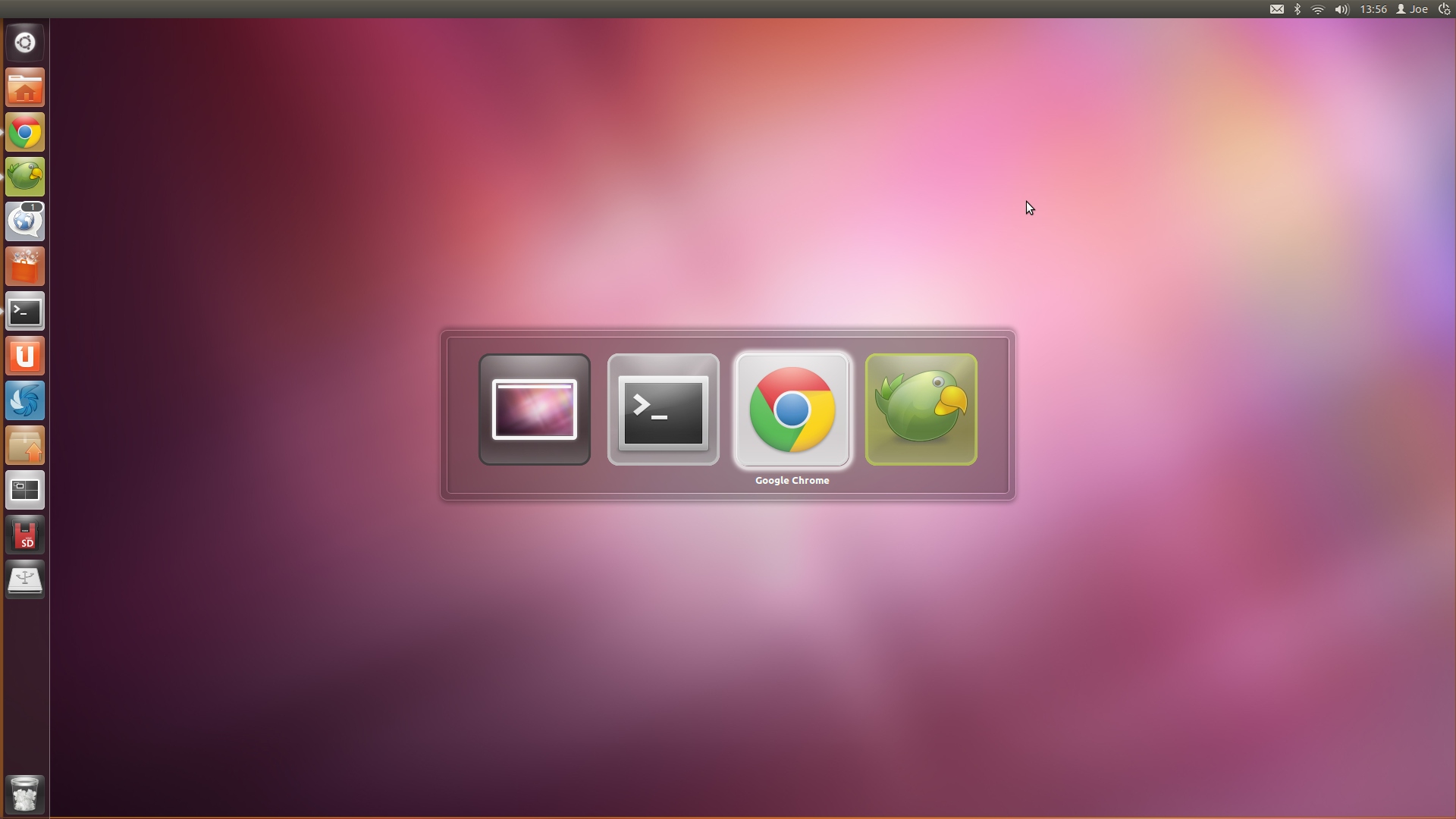
Alt+Tab changes>
Windows displayed in the Alt+Tab window switcher are now all the same height; only the width varies between applications.


Tapping down whilst highlighintg an app icon in the switcher now reveals a larger preview with a new orange border for highlighting.


Launcher


The Unity Launcher,, “Big Fat Button”, Workspace Switcher, Lenses and Track launcher icon all use the “average background colour” of your wallpaper – just as the Dash and Panel have done for the last few releases.

The result is stunning in action, as demonstrated in the short video below: -


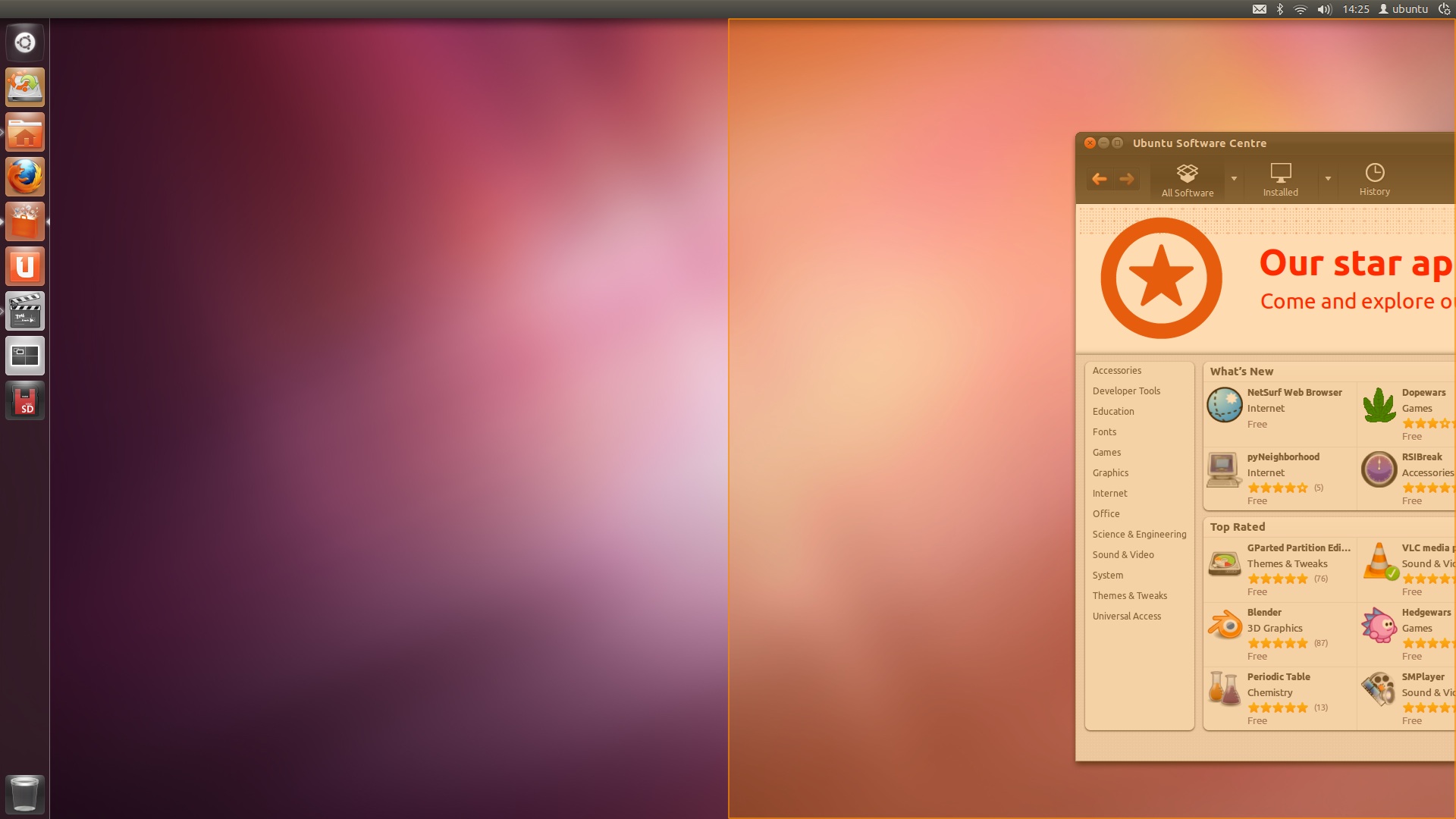
Window Snapping


I won’t call it “Aero Snap”, but I will call it less blinding: the golden effect when dragging a window to the edge of your screen has been toned down in recent updates: -


Workspaces


The “Workspaces Overview” has a tighter, more compact look, complete with orange border for “active/selected” workspace and the dimming out of workspaces without an active application on.


Software Centre


The revamped Ubuntu Software Centre has had a detailed eye cast of it, with recent updates brining tighter spacing and less padding, along with less gaudy headers (no more orange), a much better banner, and other subtle improvements.


To keep you abreast of installation progress the Software Centre has a new look toolbar-based ‘spinner’: -


Accessibility wise, the Software Centre now plays nicely with High Contrast themes: -


Dash


The Dash and Lenses now sport slightly bigger icons.


Source

Semantic Launcher Synapse Sees New Release


It’s been a literal age since we last mentioned the neat semantic file and application launcher Synapse.

With the introduction of Unity as Ubuntu’s default desktop shell the need for a dedicated ‘shortcut based’ app launcher was negated thanks to the keyboard-friendly nature of Unity’s Dash.

But Synapse has always been more than ‘just an application Launcher’; with the push of Ctrl+Space its Zeitgeist integration provides comprehensive searching of files, places, recent activities, websites and more. A raft of additional plugins provide ‘actions’ for files other than ‘open’ – such as quick uploading of images to online hosting site Imgur; control of music players Banshee and Rhythmbox; searching a dictionary for definitions, and much, much more.

What’s new in Synapse 0.2.8?


Today saw the release of Synapse 0.2.8, and with a new release comes new features, the most notable of which is the inclusion of a new theme: ‘Side Doish’.

‘Side Doish’ is a narrower version of the ‘Doish’ theme previously included.

Side Doish theme in Synapse 0.2.8

A ‘Related Files’ plugin also debuts in this release, and makes finding applications, folders and other files used in, resulting from, or otherwise used in relation to another file stupidly easy.

In the example below I searched for ‘related files’ to a ‘lastfm.py’ script that enables Last.FM scrobbling in Google Music Frame. Synapse found the file, the application it’s used with, Gedit – which was used to edit a config file – and the Terminal – which I had been using to launch Google Music Frame. 

related files plugin for Synapse

Download


Ubuntu 10.04, 10.10, 11.04 and 11.10 users who want in on the Synapse action can do so by adding the official ‘stable release’ PPA – ppa:synapse-core/ppa – to their Software Sources, running an update and then installing ‘Synapse’ from the Ubuntu Software Centre.

N.B: Synapse works (and looks) best under a composited desktop. 


Source