2011-09-08

Development Ceases On Open Source Graphics App ‘Pinta’


Is Paint.NET inspired graphics application Pinta dead? q.push(['_trackEvent','outbound-article','http://groups.google.com']);" target="_blank">According to its only developer it is.

Pinta billed itself as a ‘simple yet powerful way to draw and manipulate images on Linux’; the perfect stepping stone between applications of lesser ability, such as XPaint, and those more advanced such as ‘The Gimp’. 


Whilst it was crashy - very crashy - the feature set it sought to bring to users, along with its nippy development speed and light resource usage meant it was a popular choice for novice and demanding users alike. Informal suggestions at the bi-annual Ubuntu Developer Summit once discussed the possibility of shipping Pinta as a default application. This ultimately never came to anything.

Pinta’s last release, version 1.0, slipped out in April of this year and brought with it only minor bug fixes.

In a posting to the “google group” listing for the Pinta project the applications sole developer, Jonathan Pobst, confirmed that work on the project has ceased: -

“[Pinta] is dead because I have no desire to work on it, and I was the only  one working on it.”

It’s always a shame when any application ceases development, but doubly so when that application is as well regarded and widely used as Pinta. Thankfully, as an open source project, this doesn’t have to be the end of the road for Pinta – it’s free to be picked up and worked on by anyone with the motivation and know-how to do so.

Pinta announcement via Bill M.


Source

Flash Player 11 Hits Release Candidate


The first release candidate of Adobe’s Flash Player 11 has been made available for download.

Adobe Flash 11 brings 64-bit support, NVidia VDPAU and Broadcom Crystal HD acceleration and a variety of of technical features for web developers and flash programmers to take advantage of.

Download


Download links for both the 32bit and 64bit versions of this release can be found at labs.adobe.com/downloads/flashplayer11. Do bear in mind that this is a release candidate and not a stable build, so usual warnings about non-stable software apply.

PPA


64bit Ubuntu 8.04, 9.10, 10.04, 10.10, 11.04 and 11.10 users are also able to upgrade/install using the unofficial Flash PPA maintained by SevenMachine.

Add ppa:sevenmachines/flash to your Software Sources. Don't know how to do that? See here.

Via Phoronix 


Source

‘Pomodoro’ Indicator Timer for Ubuntu


Indicator-Pomodoro is a small tray-based timer tool designed specifically for use with q.push(['_trackEvent','outbound-article','http://en.wikipedia.org']);" target="_blank">Pomodoro technique.

The small app uses the indicator applet framework to provide a panel-based timer. Menu items for starting, pausing and stopping the count are available via a drop down menu, as is a timer showing the time elapsed since the ‘Start’ button was pressed.


When your 25 minutes have passed a notification bubble will appear informing you to ‘take a break’ – as the technique teaches. Likewise the Pomodoro tray icon will change from a grey tomato into a red envelope until you acknowledge the break.


Download


Currently the indicator has as to be built from source. Download the latest release from the Launchpad homepage @ launchpad.net/pomodoro-indicator and extract. In a terminal use the ‘cd’ command to enter the extracted folder and run: -
  • sudo python setup.py install
to install the indicator system-wide.

As the applet lacks a menu item it has to be run manually using the Terminal/Alt+F2 and entering ‘pomodoro-indicator‘.

Tip via gnaag


Source

Banshee 2.1.4 Released


Banshee 2.1.4, the third* development snapshot leading to Banshee 2.2, has been officially released.

2.1.4 is a bug fix update and comes hot on the heels of Banshee 2.1.3 which popped out into release-ville last month. That release brought support for the shipping of ‘default internet radio stations’ by Linux distributions, as well as chucking in support for various hardware devices. These included: -
  • Motorola Atrix
  • Motorola Ace
  • Samsung Galaxy S2
  • Notion Ink Adam tablet
  • Custom support for the Barnes & Noble Nook

Full release notes for the 2.1.3 release can be found here and for the 2.1.4 release here.

Download


Banshee 2.1.4 can be downloaded as source from the Banshee website.

Banshee 2.1.3 - released late August – can be installed from the ‘Banshee Unstable‘ PPA. This PPA will be updated with 2.1.4 within the coming weeks.

We don’t recommend adding this PPA without being fully aware of the perils that development software brings.

*Banshee 2.1.1 and 2.1.2 were not released


Source

2011-08-11

Adobe Edge for Linux? That’d Be Nice…


With Adobe this week announcing a new HTML5 design tool for web developers and creatives, many folk are wondering whether this could, finally, be the start of official Adobe application support on Linux.

The launch of nt','outbound-article','http://labs.adobe.com']);" target="_blank">Adobe Edge, a HTML5 web motion and design tool moulded somewhat in the same style of Adobe’s FlashProfessional software, was a somewhat inevitable move by the company. With the domineering days of Flash now in the rear view mirror,  Adobe clearly foresee milage, money and marketshare from putting foot to gas in pursuit of the HTML5 bandwagon.

But would such a chase include dropping ‘Edge’ off in Linux-ville? There’s no doubt that by putting their money where their mouth Adobe will gain a smidgen of respect from the open-source friendly community, and such respect would be intensified if they provided a Linux version of Edge.

Adobe: “let us know”


Mark Anders is an Adobe employee who took the time to respond to a user question on whether Adobe Edge would be supported on Linux. He gave this reply:

We haven’t announced plans but are looking for feedback as to what we should do. I’ll tally your vote! Thanks for asking!”

Ambiguous, sure, but not a flat out “No.” He then followed it up a few hours later with a less committal response: -

“Hey everyone, thanks for the feedback.  Not sure what will happen, but appreciate the enthusiasm.”

Call me a cynic


The cynic in me sees the response as purely polite PR on behalf of Adobe.; they have to say something to those querying, so ’polite and ambiguous’ ticks a number of boxes on the “How to be a good company representative and not piss off potential customers” checklist.

Sadly, as we’ve seen before, with Adobe consumer want rarely results in consumer get.

We’ll keep our eyes on this, but in the mean time feel free to add your voice/annoy Adobe @ forums.adobe.com/message/3833055#3833055


Source

A Surprisingly Easy Tip for Upgrading Ubuntu


Some versions of Ubuntu don’t automatically give you the option to upgrade to the latest version. In this week’s Ubuntu is Easy segment, I show you the easy way to upgrade Ubuntu to the latest release, which as of when this video was released is 11.04, Natty Narwhal!

m name="movie" value="http://www.youtube.com/v/TioSBhKANeo?version=3">

Thanks for all your previous feedback with my last video! I came up with “Ubuntu is Easy” to help new Ubuntu users get more familiar with their new Linux operating system and see that you don’t have to be an expert with the command line to get things done.

Video produced on Linux Mint 10 using Kdenlive, Audacity, and GIMP.

Do you find the GUI works just as well as the CLI for upgrading?


Feel free to reply below, or write me on my Twitter or Facebook!


Source

[How To] Create A Minimal-looking Narwhal Desktop


There’s no denying that a clean, minimal looking desktop is attractive. But how does one make Unity, with its launcher bar stuffed full of icons, ‘clean looking’?

Reader Juan Carlos Arroyo Callejas sent us his guide on getting a “clean looking Natty desktop”, which he dutifully shows off in the image below: -


The Guide


Only attempt to follow Juan’s guide if you are certain you want the look. To revert the changes you will need to work backwards reverting the steps (install instead of remove, true instead of false, etc.)

REMOVE FILES AND PLACES FROM UNITY LAUNCHER
  • sudo gedit /usr/share/unity/places/*.place

ADD THIS LINE BELOW “Shortcut=” IN BOTH TABS:
  • ShowEntry=false

REMOVE WORKSPACES (EXPO) FROM UNITY LAUNCHER

Run gnome-panel via terminal, and in workspaces make them all vertical

[1]

[2]

[3]

[4]

instead of

[1][2]

[3][4]

Close the terminal, log out log in voilà. As a bug, the WORKSPACE icon disappears.

REMOVE MESSAGING MENU FROM TOP PANEL
  • sudo apt-get remove indicator-messages

REMOVE ME MENU FROM TOP PANEL
  • sudo apt-get remove indicator-me


Source

MiniTube Updated With YouTube Fix, Drag And Drop Feature


YouTube app ‘MiniTube’ has been updated witha fix for a recent change by YouTube that ‘broke’ playback on the Flash-free desktop app. 

The updated version also adds in a new feature: you can now drag'n’drop YouTube links from your browser on to the Minitube window to have them load.

Download


Minitube 1.5 binaries for 32bit Linux (runs from the folder) can be downloaded at flavio.tordini.org/minitube

The release is also available for Ubuntu 10.04 through to 11.04 users via the MiniTube PPA maintained by Ferramosca Roberto.

Just add ‘ppa:ferramroberto/minitube’ to your Software Sources, run update manager then proceed to either upgrade any existing MiniTube installation or install anew via the Ubuntu Software Centre.

Source


Source

Unique 2D game ‘In The Dark’ Seeks Kickstarter Funds


Novacut’s recent success on Kickstarter has kickstarted an raft of Linux-based projects contacting us for coverage of their money-drives on the unique social funding service.

One that caught our eye was ‘In The Dark’ by Escapement Studios.

/uploads/2011/08/lightkick.jpg" >

Like a lot of indie games produced recently ‘In The Dark’ is a 2D puzzle-platformer boasting a unique gameplay concept involving light and shadows.

“…we designed a world in which imagination could take over where your childhood left off – a world in which monsters exist, lurking within the shadows, threatening to snatch you up the moment you leave the safety and comfort of the light.”


About


The game is built on a modified version of LÖVE – the game engine that powers our very own ‘Volleybrawl’.

Money will be used to ‘fund artists so they can take time away from their normal paying jobs to make any more progress on the game.’

The game will be commercially available on Linux, Windows and Mac OS in early 2012. Ports for iOS and Android are also on the cards.

However, that’s only going to happen if they get their funding. If you fancy chucking in a dollar or two – and remember there’s no pressure to do so – head over to kickstarter.com/projects/escapement/in-the-dark-puzzles-past-bedtime


Source

Revamped Software Centre Preview Lands in Ubuntu 11.10


The new look ‘GTK3′ version of the Ubuntu Software Centre is available for testing in Ubuntu 11.10 Alpha.

The revamped store – which we pimped with plenty of screenshots last week – is not set as default just yet. In order to use/play/break the ‘technical preview’ you need to run software-center-gtk3 from the Terminal.

Do remember that the revamped store is currently in active development and is not complete, stable or indicative of any future release.

If you’re testing Ubuntu 11.10 this update will be waiting for you in the Update Manager.

Thanks to JB


Source

Samsung Remove Ubuntu Logo From Galaxy Ad [Updated with video]


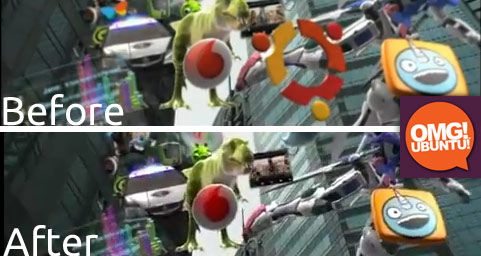
Seeing the Ubuntu logo sailing alongside hundreds of Android App icons in a TV spot for Samsung’s Galaxy S II was a strange, but not unwarranted, sight to begin with.

But Uncle Sammy appear to have had a change of heart; a ‘new’ version of the same advert is running in India with one small difference: no more Ubuntu logo.


We first wrote about the advert back in early July. The prominence of the icon led us to suggest a handful of reasons as to why the logo was there. Above all it was just a fun little spot; after all it’s not often the Ubuntu logo is beamed across millions of TVs for the world to see!

Ubuntu Gone


Over the last week we’ve heard from a number of our readers in India, the territory in which the ad is shown, that a new version of the advert is showing with the only perceivable difference being the removal of the Ubuntu logo from the beginning of the advert.

Anecdotally, Samsung also removed the ‘Ubuntu’ version of the advert from YouTube.


Maybe we shouldn’t have said anything? ;)

Thanks to all who @’d, +’d and mailed in about this


Source

Linux Users Continue To Spend More On Humble Indie Bundle


Linux users continue to pay more for the Humble Indie Bundle 3 than their Windows or OS X counterparts. 

With just over one day left to nab eleven awesome DRM-free indie games for whatever price you’re willing to pay, I thought it would be nice to take a quick look at how the Bundle is doing before the last day splurge sets in.

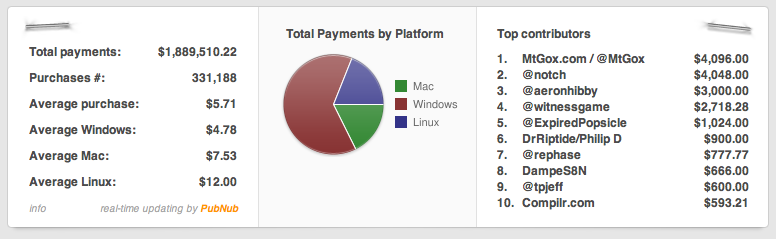
Humble bundle sales as of August 8 2011

So far the Bundle has amassed over $1.8 million – and should surely tip the $2 million mark by the end of its run this time tomorrow. For comparison the totals for the previous Bundles were as follows: -
  • Humble Indie Bundle | $1.2 Million
  • Humble Indie Bundle 2 | $1.8 Million
  • Humble Frozenbyte Bundle | 700k

Generous Linux folks


Once again Linux users are the most generous of the bunch so far, paying on average $12 for the compendium of titles. To put that $12 into context that’s almost $5 more than Mac users pay are willing to shell out, and over $7 more than what Windows users cough up. Previous Bundles have seen Linux and Mac users making up over 50% of all sales.

Why are Linux folks just so damn generous? 

I lack a psychology degree, so I can’t expound on that question any certainty. The nature of sharing, supporting and giving that is so central to the Open-Source ethos, mixed in with a desire to thank and support developers who go out of their way to support them, are likely to be strong motives behind the support.

That and paying for software is a bit of a novelty ;)

Extra Titles


Extra titles have been added to Bundle 3 since its launch a week ago, making a total of 12 games (plus a free trial of Minecraft) are now on offer to anyone paying more than the ‘average price’ of $5.71.
  • Crayon Physics Deluxe – Physics based puzzle game
  • Cogs – Steampunk themed puzzle game
  • VVVVVV – Retro-themed platformer with insane gravity element
  • Hammerfight - weapon-based melee ‘smash ‘em up’
  • And Yet It Moves – Beauitful and award winning physics platformer
  • Steel Storm - Top down action shooter
  • Atom Zombie Smasher – RTS game, zombie-style
  • Braid - Critically-acclaimed puzzle game
  • Cortex Command – 2D side-scroller
  • Machinarium – Visually stunning point-and-click puzzle game
  • Osmos – Single player puzzle game
  • Revenge of the Titans – RTS game
If you purchased your bundle before the extra games were added fear not – just head to your ‘Download’ area (sent via e-mail when you purchased the bundle) to download them.

Buy


With barely over one day left to buy get your skates on and humblebundle.com/


Source