2011-07-15
Wallpaper Contest For Ubuntu 11.10 Opened
The wallpaper contest for Ubuntu 11.10, which sees a number of user submitted wallpapers selected to ship on the Ubuntu CD, is now open for submissions.
As with previous cycles users can submit both photographic and non-photographic (illustrated) wallpapers to the Flickr group @ s/oneiric-wallpaper-submissions/" onclick="javascript:_gaq.push(['_trackEvent','outbound-article','www.flickr.com']);">flickr.com/groups/oneiric-wallpaper-submissions.
The deadline for submission is 11th August 12PM BST.
A wiki page with guidance on formats, resolutions and do’s and don’t's for successful entries can be found at wiki.ubuntu.com/Artwork/Documentation/Backgrounds
Need inspiration? Check out our wallpaper tag.


‘Satchbook’ is a powerful, but pricey, Ubuntu laptop
With a 15.6″ screen, a dual-core i5 processor and 8GB of DDR3 RAM German company Rockiger‘s Satchbook might read like a MacBook Pro, but it comes with Ubuntu preinstalled.
cdn.omgubuntu.co.uk/wp-content/uploads/2011/07/laptop-ubuntu-linux.jpg" >

Rockiger isn’t a name I’ve heard before, but given the company is primarily focused on the German market that’s not surprising.
Like most 15″ laptops the Satchbook isn’t the prettiest thing to look at. Its internals more than make up for this: -
- 15.6” display (1366×768)
- 2.3 GHz dual-core Intel Core i5 (Sandy Bridge) Processor
- 8 GB 1333 MHz DDR3 RAM
- Intel GMA 3000 graphics
- 500 GB SATA hard drive running at 7200 rpm
- DVD Burner
- 6 cell battery (estimated at 8 hours run time)
- German keyboard with numeric keypad and Ubuntu key
Amongst the ports and extras are: -
- HDMI out
- Webcam
- VGA out
- 3 x USB
- Audio in/out
- 4-in-1 card reader
- Ethernet
- Bluetooth
- WiFi b/g/n
Rockiger also chuck in a cheat-sheet of keyboard shortcuts too – a commitment to the OS and its users that I can’t help but admire.
The price? A rather pricey €997 ($1400/£900/AU$1320)
10% of every laptop purchase is donated to open source applications, amongst them video editor OpenShot and word processor AbiWord.

How does it compare to others in the market?
It may be pricey, but are its competitors in the Ubuntu-laptop market?
The System76 Pangolin Performance base unit boasts the same processor, the same screensize and the same graphics for just €494/$699. This ‘saving’ costs you 3/4 of the RAM and half the HDD size.
What happens when you ‘configure’ the Pangolin to match the Satchbook? It still comes out cheaper, costing just $950/€675.
For around the same price as the Satchbook (€971/$1370) System 76 offer the ‘Serval Professional’ (read our review of it here).
The Serval Pro comes with a faster, quad-core i7 processor, the immensely powerful Nvidia GeForce GTX 560M GPU and 4GB of DDR3 RAM.
To buy or not to buy, that is the question…
With a unit to test I’m unable to provide any performance comparisons, but the specifications of the Satchbook will see Ubuntu fly on it. The price, however, likely won’t fly.
Capable ‘Ubuntu laptops’ already command a premium over Windows-based versions.
Rockiger should be commended for choosing Ubuntu and embracing open-source so whole-heartedly. Germans who can afford to ‘vote with their wallet’ wouldn’t find Rockiger a bad name to choose.
Tip | Marco
elementary Music App ‘BeatBox’ Sees New Release
The first stable release of lightweight music player Beatbox is now available for Ubuntu users.
Beatbox 0.1 is developed by Scott Ringwelski. An attractive and feature rich music player Beatbox is also light on resource usage.

Features include: -
- Library Management, including auto-importing to ~/Music folder
- Audio and video playback
- Playlists/Smart Playlists, including ‘Similar songs’
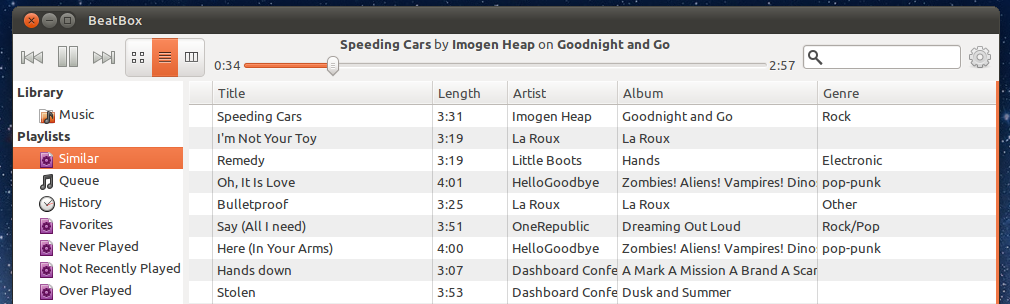
- Last FM integration
- Ubuntu Sound Menu support
- Equalizer

- List, album view and miller column views

- Shuffle, repeat, and queue options
- Automatic album art and artist image fetching
- Metadata tag editor (with mass editing)

Future developments to Beatbox will target adding device synchronization support and a music store.
Install Beatbox
Beatbox 0.1 is available to install for Natty users and Oneiric testers by adding the following PPA: -
- ppa:sgringwe/beatbox
Beatbox requires one dependency not available in Ubuntu - libsqlheavy.
Libsqlheavy can be installed in Ubuntu 11.04 and 11.10 by adding the elementary Desktop PPA:
- ppa:elementaryart/elementarydesktop
As this PPA will upgrade stock Nautilus to Nautilus-Elementary in Ubuntu . They may you may wish to download the .deb for libsqlheavy separately at : -
The nD: A $20 Indie Handheld Games Console
How many handheld gaming consoles-stroke-platforms can you name? Chances are a good few. But is there room for another?
The ‘Nd’ project hopes so.
nD = Indie
The nD is a new handheld ‘indie’ gaming console currently under development that will run a custom Linux OS, making it ideal for current open-source developers to port their games over to.
The device will be sold for just $20 – the price it costs to make.
Games developers will be free to develop on the nD with the option to sell their wares through the nD “App Store”, receiving a healthy 90% cut for each purchase. The remaining 10% will go to Nd.
Promotional video ahoy: -
The man behind the project
The project is steered by self-taught game developer Robert “Bob” Pelloni. Bob is infamous in the gaming community for staging a 100 day protest at Nintendo for delaying, and eventually denying him, official developer status.
If you can’t join ‘em, beat ‘em?
How far along is it?
The Nd console is in ‘development’ and no units are available for purchase.
Bob says: -
“We have a couple working prototypes. development boards are being prepared and will be made available.”
Further information
The nD site can be found @ the-nd.com.
Thoughts
I should note that I am not a Business Major. Hell, I even slept through compulsory business modules during University.
But it’s hard to see how this project will come to fruition.
Bob is currently seeking investment to bring the nD to market.
For me, the idea of selling hardware at cost is unattractive. Even a dollar profit from each console would be more a more enticing prospect sat alongside a slice of 10% from software sales in an untested software store to an untested market.
To go on a tangent, it seems that ‘App Stores’ are the new Gold Rush.
Whilst Apple’s iOS App Store has made a handful of developers millionaires Google’s Android and Chrome WebStores, as well as Apple’s desktop App Store, are all posting very small sales.
Couple this with the launch of a platform that, on the surface at least , could prove attractive to open-source developers creating free games, and the chance of the nD making any kind of substantial profit starts to look small.
I wouldn’t put the nD on your Christmas lists just yet, folks.
No related posts.
Gwibber Gets Revamped For Ubuntu 11.10: Faster, Lighter, Prettier
Gwibber – it may be Ubuntu’s default social client but do you use it? Chances are you don’t.
For despite have a great feature set and support for almost every major social networking site, Gwibber has been tarnished with a reputation for being slow, laggy, resource hungry and a notification-nuisance.
But come Ubuntu 11.10 Gwibber will be a very different beast.

Gwibber Redux
Gwibber 3.1 sees the social app get rewritten and redesigned. The Webkit interface of old has been traded for Vala and GTK3. the layout and look have been streamlined and the result is a fast, responsive and resource-efficient client.
So why the change?
“The old python/webkit based client used way to much memory and it was rendered as a single static view which needed to be rendered each time anything changed.” Gwibber developer Ken VanDine told me when I asked about the reasons that led to the big revamp.
“It was hard to improve the experience in the old client without significant changes, so moving to Vala and GTK3 seemed like a natural choice. We also wanted to share more infrastructure with the Gwibber Unity lens.”
Big performance boost
As an example of just how efficient the ‘new’ Gwibber is Ken told us of a test he did shared with us the results from a test he conducted using the clients.
“The old client limited the stream to the latest 50 posts and would use about 150MB of RAM. The new client doesn’t limit the posts, in my test with 3000 posts in the stream it used about 42MB RAM.
Not only is that 3000 posts in a stream, we keep all the streams “hot” for fast switching between them. So we actually have them all created and hidden.”

The result was more than noticeable when I took the the ‘new’ Gwibber for a spin earlier. Scrolling through Tweets is smoother, switching between views is faster and the appearance of new updates/tweets is far far quicker than Gwibber under Natty.
Snap test
I did take a quick at Gwibber’s resource usage whilst using the old client and then again under the new client. I left both open for the same amount of time (10 minutes) and both were tested under the same Ubuntu installation on the same computer.
Old Gwibber used, combined, around 100MB of RAM. The new Gwibber? Just 32MB. Oh how my netbook will rejoice.
A new look and new features
Gwibber 3.1 comes with a new look designed by Canonical’s Neil J Patel.
“From the start, the idea was to make a UI that would make people stop complaining about Gtk while making Gwibber the best client on Ubuntu. I think we’re slowly getting there.”
Slick animations accompany button presses and view changes. This might sound like a small ‘blingy’ touch but it’s one that makes Gwibber 3.1 more than match up to the dominant Twitter apps available for OS X and Windows.
Gwibber 3.1 also sees a number of much requested features implemented, such as sorting streams by oldest/newest posts first, and the planned search tool that ‘narrows what is displayed in the stream based on your search criteria’ sounds like a killer feature.
As soon as Google release an API for Google+ I’m told that Google+ will be supported in Gwibber.
Still in development
With Ubuntu 11.10 yet to hit Alpha 3 its not surprising to find some key features are in the process of being added. The majority of the missing functions are expected to land in advance of The Ocelots release in October.
And if all of the above hasn’t sold you on Gwibber 3.1 the following tidbit from Neil J Patel certainly should: -
“It’s going to have the cutest/nicest error messages you’ve ever seen ;)”
Gwibber 3.1 will land in Ubuntu 11.10 shortly.
Thanks to Ken, Neil and Jorge
Neat Timelapse Video Made in Ubuntu Using Open-Source Apps
Dudu M. mailed in to share a time-lapse video he created on Ubuntu using nothing but free open-source tools and a camera.
“I used gtimelapse (a frontend to gphoto2) to control my camera to take a lot (more then 2000 ) [of photos] using ffmpeg. I combined the images as a video, and made the final touches in Openshot.”
The result is this: -
Pretty neat! You’ll find many of the applications used available to install from the Ubuntu Software Centre.
The GPhoto2 front-end ‘GTimeLapse’ can be downloaded from its project page at sourceforge.net/projects/gtimelapse/
DuDu via Tips
Run Ocelot, Run! (Unity Report for 13 July)
This is a guest post from Ahmed Kamal and Jorge O. Castro, who will be posting Unity updates over the coming weeks (Original Post)
Welcome to another installment of the Unity progress report. Many Unity team members are recovering from the Dublin sprint, however the polish is still is still trickling in. Thanks for the great fixes Rafał, Andrea, Daniel and Oliver! Also a reminder that we have an IRC meeting today at 1800UTC on #ayatana on Freenode if you’d like to get started hacking on Unity.
Unity Contributor Activity This Week
- Rafał Cieślak shows his appreciation to detail by adjusting the distance between application indicators (not applications menus) since they were too apart from each other. The spacing was decreased as a fix to bug #684114 but now has been increased by 1px for a more consistent look.
- Rafał also fixes an annoyance where the window title switches to the menu, when hovering over the window buttons in the top panel. This can be a bit distracting indeed, since you would like to act on the window, and not with its menu. Luckily this is no longer the case.
- Andrea Azzarone does some pretty rocking work as well! Andrea’s commit unmounts/ejects an USB-stick by dragging it to the trash-icon on the launcher. This also spawns a notification to inform the use of the succeeded operation. I really like this one, thanks Andrea!.
- Andrea also fixes another bug that eliminates unneeded disk-I/O while dragging a launcher-icon to a new position. Less disk I/O is always welcome!
- Andrea also blows away 5 memory leaks as uncovered by valgrind and fixes a memory leak in the panel indicator. This improves the stability of the panel as well as memory consumption.
- Daniel van Vugt works on some fit and finish where on mouse-over the highlight background square is now correctly aligned even for smaller icons such as Thunderbird.
- Oliver Sauder improves the run dialog (the alt+f2) dialog, such that it always opens up showing the most used commands, and not start up blank the first time after reboot. This helps provide a more consistent experience, thanks Oliver for the fix.
Other branches for incoming fixes are in the review queue. Thanks to all the contributors who’ve spent time making Unity better. Want to dive in? Check out the big list below and dive in!
Things going on in Oneiric
A pretty nasty bug was squashed which could lock a user out of the system. Apparently this bug is due to the recently uploaded base-files which now creates a /run directory, which might get partially populated during runtime. This confuses udev, causing the keyboard and mouse not work in X ew! Luckily the bug has been squashed, all the juicy details are in 807306
You can check out the rest of the progress on the desktop from the desktop team’s report for the week.
The Big List
Here’s a list of targeted bugs that the design team has picked out as a result of user testing and feedback that would make Unity nicer to use. Here’s the full list if you want to dig in.
- 727902 Launcher icon highlighting should not switch off as soon the cursor moves after the app spread appears
- 676453 Launcher – Add ‘installing’ animation for when app is installed via drag & drop
- 616866 Installation of apps by dragging them to the launcher
- 750375 Dash – Cursor navigation allows the user to keep scrolling down indefinitely
- 765715 Launcher – When a app icon de-couples from the Launcher a small shadow should appear on the bottom and right sides of the icon
- 767272 Top bar menus – there should be a very quick and subtle fade out/in effect when a user shifts from one menu to another or closes a menu
How to Get Involved
1. Get the Code
Follow the Step by Step Instructions and Wiki Page. This will get the code from Launchpad, set up your development environment, and getting you used to the Launchpad workflow.
2. Pick a Bug
Here’s the full list, or you can just join the team and watch them roll in and pick what you’d like.
3. Fix your bug and then get your code into Unity
Don’t worry we won’t leave you hanging, you can get a-hold of a Unity developer through many different ways:
- Join the ~unity-community-hackers team and start digging in.
- We now have a Weekly Meeting at 1800UTC on #ayatana on Freenode IRC if you feel like hanging with us and getting organized and ask questions
- #ayatana on freenode IRC during European and American workdays. Or you can post to the mailing list if you have a question.
- We also have weekly IRC Q+A for any developer who wants to dive in and ask a Unity developer. 7pm-8pm UTC (That’s 2pm EST) every Friday!
64bit Flash Update Adds Broadcom Crystal HD Support For Linux

A new beta release of Adobe Flash Player has been released for both 32 bit and 64 bit users.
64bit Ubuntu users previously needed to use the outdated Adobe Flash Player “Square” beta. This release is also notable for being the first time Adobe have offered both 32bit and 64bit binaries of the same version at the same time.
What’s new?
At first glance, not much. The release notes state name as ‘TLS Secure Sockets Support’ (for secure connections) and ‘Asynchronous Bitmap Decoding’ (for smoother animation).
Phoronix report that there is ‘still no support for VA-API acceleration interface’ or XvBA, both of which enable the offloading of video processing grunt to a systems GPU.
Netbook users whose devices have a Broadcom Crystal HD video accelerator will, potentially, benefit from lower CPU usage and better playback of HD flash content around the web thanks to references in the binary to ‘libcrystalhd.so’ and ‘Broadcom,H264′.
Where can I get it?
Download links for both the 32bit and 64bit versions can be found at labs.adobe.com/downloads/flashplayer11. Usual caveats regarding beta software apply.
PPA
64bit Ubuntu 8.04, 9.10, 10.04, 10.10, 11.04 and 11.10 users are also able to upgrade/install using a PPA maintained by SevenMachine. As this is a third party PPA and not provided by Adobe you install at your own risk.
Add ppa:sevenmachines/flash to your Software Sources. Don’t know how to do that? See here.
Thanks to SuperLolz. via Phoronix
Ubuntu 11.10 Development update
This is a guest post from Daniel Holbach, who will be posting updates about Ubuntu Development. (Original Post).
Ubuntu Development Update
With Alpha 2 out of the way, loads of new things are getting into Ubuntu: the first cut of the Unity greeter landed, lots of projects get ported to GTK3, bugs get fixed, etc. These are definitely exciting times. As always: the status overview should give you a very detailed look on how each feature is progressing.
What’s also happening this week is Ubuntu Developer Week. Every day from 16:00 UTC to 21:00 UTC we have excellent tutorial sessions on IRC that explain lots of different aspects of Ubuntu Development. Join in, learn, ask and discuss. Logs of sessions that already happened are linked from the timetable. What’s still to come? Today: Writing apps with QML, deploying to the cloud using Ensemble, fixing build failures on ARM, visual rendering with the nux library, Java library packaging. Tomorrow: fixing bugs in compiz, hacking on Ubuntu websites, triaging bugs, Lubuntu development and project lightning talks. Awesome!
If you want to get involved in packaging and bug fixing, there’s still a lot of bugs that need to get fixed, particularly packages that fail to build.
Since last week a bunch of people got their first upload into Ubuntu! I’m thrilled! This time it’s four gentlemen who deserve a round of applause! Alexander Fougner (who now got busy helping retheme the Ubuntu Packaging Guide), Christian Titze, Kent Baxley and David Smith. Good work everyone, keep it up!
New Contributor
This week I talked to Juan Negron from the USA, here’s what he has to say:
 What was your experience like?
It was very smooth as I had a lot of support from my co-workers at Canonical and the Ubuntu community as well. There are a lot of smart (and patient) people hanging out on IRC able (and willing) to help out when needed.
Did you run into any problems?
Most of the problems that I ran into were due to inexperience, and for those, the people around me (Canonical/Ubuntu) where there to help.
A few examples:
- The induction into using the wiki as the first place to look for information.
- best practices when working with bzr and launchpad (bikeshed helps a lot with release-test, release-build and release)
- lintian on my side: How to use lintian to help you clean up your packages before uploading.
…. some other that don’t come to mind right now.
Fortunately, there has always been someone there to help me so I have been able to overcome those quickly enough where I can get the job done and now (thanks to all of the people that have helped me in the past), I am now in a position where I can pay it forward to those in need.
What do you think could have been easier?
There are some things in the packaging and its approval process that could be made easier but, so far, I think it to be a painful but necessary step to ensure that all the developers pay enough attention to details to maintain the high quality of Ubuntu. Going through that learning curve and process has forced me to be more detailed oriented… and that’s always a good thing!
How did you generally like it?
So far, I’m loving it!! I have been able to meet and work with some of the smartest people on the planet so, I feel more empowered to tackle more ambitious challenges due to the support that the community provides.
Get Involved
- Read the Introduction to Ubuntu Development. It’s a short article which will help you understand how Ubuntu is put together, how the infrastructure is used and how we interact with other projects.
- Follow the instructions in the Getting Set Up article. A few simple commands, a registration at Launchpad and you should have all the tools you need, and you’re ready to go.
- Check out our instructions for how to fix a bug in Ubuntu, they come with small examples that make it easier to visualise what exactly you need to do.
Find something to work on
Pick a bitesize bug. These are the bugs we think should be easy to fix. Another option is to help out in one of our initiatives.
- Help out with the dh_python2 porting.
- Help out with fixing packages that don’t build anymore.
In addition to that there are loads more opportunities over at Harvest.
Getting in touch
There are many different ways to contact Ubuntu developers and get your questions answered.
- Be interactive and reach us most immediately: talk to us in #ubuntu-motu on irc.freenode.net.
- Follow mailing lists and get involved in the discussions: ubuntu-devel-announce (announce only, low traffic), ubuntu-devel (high-level discussions), ubuntu-devel-discuss (fairly general developer discussions).
- Stay up to date and follow the ubuntudev account on Facebook, Identi.ca or Twitter.
No related posts.
Video-Editor ‘Novacut’ Unveil New UI prototypes, Available To Try Online
Two interface prototypes for features of collaborative video editor Novacut have been unveiled.
Interface designs for ‘Slices’ – an innovative method for frame-accurate clip trimming – and for sequences – where by a collection of ‘slices’ are arranged in a pseudo-storyboard format – are demoed in two videos by lead Novacut developer Jason Gerard DeRose.
The prototypes have been built using HTML5 and jQuery, although readers should note that they are not complete nor should be used ‘…to determine the limitations of Novacut.


Demonstration of ‘Slices’ prototype running on the Nokia N900:
Demonstration of Slices and the Sequencer:
Try it out live
You can go hands on with the Slices prototype on the Novacut site here. Be aware that these are prototypes and thus not feature complete.
The source code can be downloaded here, modifications should be directed to the Novacut Launchpad page.
15 days left to raise $19, 000
Novacut are aiming to raise $25,000 by July 28th for development of the project. Over 120 people have already donated to the projects’ Kickstarter pot, with $19, 000 yet to be raised.
If you chuck $10 in you’ll even get your named listed in the editor itself!
Edited by Joe Sneddon
Gnome Screencasts Episode 5 – How To Make A Video Player
A new episode of Daniel Siegel’s awesome ‘new developer friendly’ series ‘GNOME Screencasts’ is available to watch online.
The series, which has had over 17, 000 views so far, sees Daniel walk users through development on the GNOME Platform.
The latest installment sees Daniel use GTK+, Clutter, GStreamer and Python to create a ‘Snazzy video player’.
Don’t forget to Flattr this episode if you have found it particularly helpful. Details over on the Vimeo page.
For previous episodes click here.
Acclaimed Indie Game BEEP Released For Linux
Linux users can get their paws on physic-based platform game BEEP ahead of its launch in the Ubuntu Software Centre through tp://Gameolith.com" onclick="javascript:_gaq.push(['_trackEvent','outbound-article','Gameolith.com']);" target="_blank">Gameolith – a new online games store for Linux.
According to BEEP developer Kiaran Ritchie, the final build of the game has been sent to Canonical and should appear in the Ubuntu Software Center ‘very soon.’
Buy BEEP at Gameolith
Subscribe to:
Posts (Atom)