2011-05-28

[How to] Enable Unity integration for remote desktop app ‘Remmina’


Remote desktop client ‘Remmina’ doesn’t have Ubuntu Unity launcher integration by default, but it’s easy enough to add with this script by Daniel S.

To better show off what it does, and do bear in mind that I’m not a user of remote desktop applications so these are not the most informative of screenshots, here is Remmina’s launcher menu by default in Ubuntu 11.04: -

Selection_075

And this is Remmina with Unity integration:

Selection_077

Look useful to you? Head over to code.google.com/p/remmina-unity-launcher where instructions on how to download and enable the feature is available.

As always, be cautious when using scripts from untrusted sources.


Source

5 Narwhal themed wallpapers


The default wallpaper of Ubuntu 11.04 was an iterative, if mediocre, affair.

As it lacked the moniker mascot that so many users of Ubuntu love to see, I took to the interwebs to find five truly natty narwhal wallpapers that will make a splash – pun fully intended – on your desktop.

<em>Note: Click on the wallpaper image to be taken to its relevant download location.

Nathan


narwhal-wallpaper_SANSLOGO_2560

Tail


Variations on a Narwhal


variations-on-natty-narwhal_4-3_(with-logo)_1024x768_by_madeinkobaia-w500

Widescreen Narwhal Wallpaper


UNW-w500


Source

2011-05-21

PSensor lets you easily monitor hardware temperature in Ubuntu


Psensor is a slick little utility for monitoring hardware temperature in Linux.

"display: block; float: none; margin-left: auto; margin-right: auto;" title="Psensor - Temperature Monitor_002" src="http://cdn.omgubuntu.co.uk/wp-content/uploads/2011/05/Psensor-Temperature-Monitor_002-500x178.png" alt="" width="500" height="178" />

My graphics card fan is bust.

Well, I say bust but what I actually mean is that I disconnected the fan because it was so freaking loud! I do intend to buy a replacement cooler for it shortly, but in the mean time Psensor allows me to keep an eye on its temperature over a given period with the data recorded and presented in graph form for easy digestion.

Better yet it can provide notification alerts when hardware reaches a set temperature.

Psensor notify-osd alert

Other hardware


But its not just useful for monitoring noisy graphics cards either. Psensor can monitor the temperature of your…
  • motherboard and CPU sensors (requires lm-sensors to be installed).
  • NVidia GPUs
  • Hard Disk Drives (requires hddtemp to be installed).
  • Fan speed (again, requires lm-sensors to be installed).

lm-sensors requires configuration after installation. Run ‘sudo sensors-detect’ form a Terminal to begin this.

Download

Psensor is available for Ubuntu 9.10, 10.04, 10.10 and 11.04. Standalone .deb installers can be downloaded @ wpitchoune.net/psensor/files/ubuntu/

A PPA is also available for the same set of Ubuntu versions, however the most recent release is only available for Ubuntu 11.04.

Add ‘ppa:jfi/ppa’ to your Software Sources, update and then search for and install ‘psensor’ from the Ubuntu Software Centre.

The usual caveats apply when downloading and install .deb files form third party sites or non-Canonical PPAs – i.e. you do so at your own risk.


Source

Activity Log Manager for Zeitgeist lets you blacklist files and apps, delete your history, more


The first release of ‘Activity Log Manager’, a new tool for managing Zeitgeist-logged activities and blacklists, is now available for download.


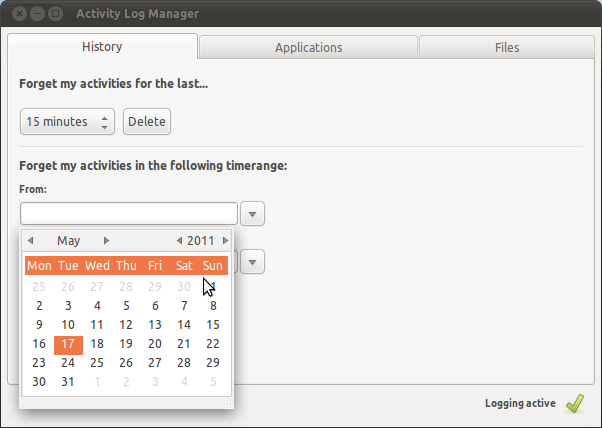
The tool provides quick and convenient access to blacklisting, exempting and deleting activities monitored by the Zeitgeist semantic-search tool. Don’t want images logged? Just check off the ‘images’ box under the ‘Files’ tab. If you don’t want an entire folder monitored just add it to the folder blacklist. Same goes for applications too, which can be easily added graphically via a neat selector menu.

Adding files to the blacklist in Zeitgeist

Download


Activity Log Monitor requires Zeitgeist 0.8.0 or higher. This is higher than the version shipped in Ubuntu by default, so Ubuntu 10.10 and 11.04 users will need to add and upgrade their existing Zeitgeist engine using the Zeitgeist PPA. To do this just add ‘ppa:zeitgeist/ppa‘ to the Software Sources dialog accessible via the Ubuntu Software Centre’s ‘edit’ menu.

Once added upgrade Zeitgeist via the Update Manager, log out and back in to restart Zeitgeist. The proceed to install ‘Activity-log-manager’ via the Software Centre.


Source

GTA2 inspired game ‘Greedy Car Thieves’ adds new cars, sounds, physics and more


A new test release of Grand Theft Auto 2 inspired Greedy Car Thieves, which sees a number of changes included, is now available for download.

Amongst the changes present are an improved server finder for online gameplay, a new ‘Heads up’ style GUI and two new game types – ‘Bombmatch’ and ‘Race’. Gameplay sees destroyable street lights, improved animations and physics and new vehicles added.

screenshot13-w1000

Greedy Car Thieves is available to download for free during its development phase, with Linux installers for 32bit and 64bit available @ gct-game.net. Dependencies needed to run the game can be installed by clicking here.

With thanks to Chomzee


Source

‘YeoWorks Ubuntu Solutions’ provides one-click fixes for common Ubuntu issues


Solving minor annoyances, frakk ups or 64bit issues in Ubuntu just got super easy thanks to ‘YeoWorks Ubuntu Solutions’ – a small nautilus-script based application that provides one-click ‘solutions’ for a raft of Ubuntu issues.

It helps to think of ‘YeoWorks Ubuntu Solutions217; like a torch: you won’t need to use it all the time but the second the power goes out you’ll be really glad you have it.


Not every option is relevant to all users – but that’s the beauty of it; by not being a catered to a specific desktop environment or task set it proves to be invaluable, and for my needs at least, a must-have – utility.

Sitting amongst the nifty solutions/tweaks provided are: -
  • Fix ‘Classic’ GNOME desktop
  • GNOME 3 fixes and uninstall
  • System cleaning
  • Changing root or user password
  • Fixing Flash 64bit issue in Firefox
  • ‘Convert 32bit .deb to 64 .deb’ in particular.

And a tonne more.

Download @ yeoworks.cz.cc/YeoWorks-Ubuntu-Solutions-Installer.zip.


You can also see it in action in the video below.


Disclaimer: Users installed 3rd party scripts and applications at their own risk. Whilst we try to ensure applications we feature are safe and non-malicious we can only ‘vouch’ for the version of the application/script featured at the time of writing.

Thanks to SoloDev


Source

This awesome Ubuntu Software Centre mock-up would get my custom


The current look of the Ubuntu Software Centre isn’t as great as it could be. Department buttons are small, promoted items lack any information, and the general style of the centre just pales in comparison to other application stores.

Although plans are afoot to improve it for the next release of Ubuntu due in October, with faster start-up times, refined visuals, larger icons, and Unity Launcher integration all mooted for inclusion, DeviantArtist ~fuzzynoise took pixel to canvas to mock-up his ideal vision of how the Software Centre  should look…


It doesn’t differ too greatly from what is already there; it simply makes the ‘featured apps’ section more prominent and eye-catching, with tabs for switching between feature, ‘new’ and ‘recommended’. The addition of an application ‘description’ within the promoted space is particularly sweet to see; I hate having to click-through to an applications’ install page to find out what it actually is.

The ‘department’ buttons remain small and non-touch friendly, and the side-bar, which has been suggested for hiding/removal in the next iteration of the software centre, remains on show here.

kv1dr


Source

Drag and drop UbuntuOne file uploader for the Ubuntu Unity Launcher


The Unity Launcher in Ubuntu 11.04 provides has some great features for developers to take advantage of, resulting in nifty, neat and useful applications that are far more that ‘just’ an application launcher.

Such as ‘UnityOne’ – a neat UbuntuOne file uploader applet for the Unity Launcher.

The developer of the applet, Jeff S., mailed in to tell us about it: -

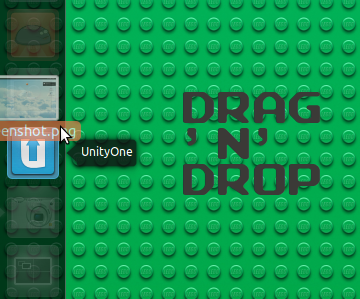
“Hello OMG! ubuntu! I just wanted to let you guys know that I have made a little applet for the unity launcher that I like to call “UnityOne”, that makes it so that when you to drag a file/folder over the UnityOne icon, it puts whatever you dragged over it into your ubuntu one folder.”


The applet supports over 100 different file types, and even has its own icon.

Download


The applet is packaged up in a .zip archive which can be downloaded at the link below.

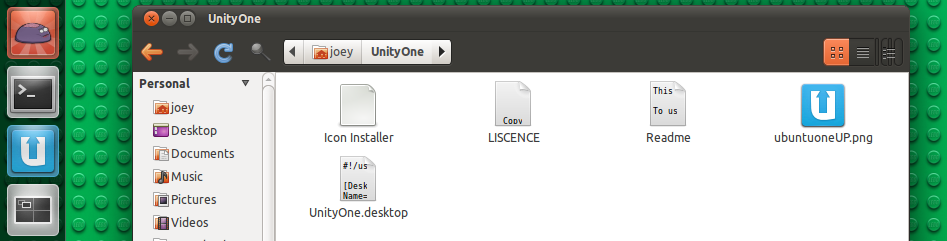
You will need to extract it into your home folder for it to work properly. To install the blue icon just double-click the file that says “install icon”.


Add it to your Launcher by dragging the “UnityOne.desktop” file from the extracted folder and onto the Unity Launcher . You can then drag and drop files onto it to have them placed in your Ubuntu One folder and, assuming you have it set up, synced with your Ubuntu One account.


No related posts.


Source

GNOME to drop support for BSD, Solaris, Unix?


Take this one with a pinch of hearty pinch of salt for now, but, in a post to the GNOME Developer Mailing List, Jon McCann – a tour de force in the GNOME world and pioneer of GNOME Shell itself – has urged that GNOME not only become an OS, but forgo keeping support for other non-Linux operating systems such as BSD, Solaris and Unix in the process.

Systemdwut?


What’s the beef? First let’s get up-to-speed on the issue courtesy of Redditor deebeeoh: -

“[GNOME] are proposing systemd as a dependency for GNOME Shell to function. systemd has made it quite clear that no port to other OS’s would be supported (or even easy due to technical details).

In short, by depending on systemd, they force the OS to pick a particular init system which is only supported in Linux. This is all proposed for GNOME 3.2, so very soon.”

‘The future of GNOME is an OS”


Today, in reply to Debian’s Josselin Mouette on the issue of whether adopting the Linux-only init replacement daemon ‘Systemd’ was an agreeable step to take, McCann wrote: -

“The future of GNOME is as a Linux based OS. It is harmful to pretend that you are writing the OS core to work on any number of different kernels, user space subsystem combinations, and core libraries. That said, there may be value in defining an application development platform or SDK that exposes higher level, more consistent, and coherent API. But that is a separate issue from how we write core GNOME components like the System Settings.

It is free software and people are free to port GNOME to any other architecture or try to exchange kernels or whatever. But that is silly for us to worry about.

Kernels just aren’t that interesting. Linux isn’t an OS. Now it is our job to try to build one – finally. Let’s do it.

I think the time has come for GNOME to embrace Linux a bit more boldly.”

This bold, rather rousing, read is completely understandable in the context of GNOME becoming the best that it can.

The good news is that the ‘systemd saga’ is on-going and many further discussions are yet to be had before any commitment to a decision is made either way.

GNOME Devel mailing list via Reddit


Source

Midori 0.3.6 brings welcome fixes, small speed bump


Lightweight webkit web browser Midori got a minor version bump yesterday – but what’s new and what’s improved?

buntu! | Everything Ubuntu. Daily._021" src="http://cdn.omgubuntu.co.uk/wp-content/uploads/2011/05/‪OMG-Ubuntu-Everything-Ubuntu.-Daily._021-500x352.jpg" alt="" width="500" height="352" />
Midori 0.3.6 is primarily a bug fix release.

Midori's handling of CSS fonts and shadow rendering are improved – important when viewing OMG! Ubuntu!, for example. The browser user agent string – these are unique identifiers that help a web page detect browser version so it can, if needed, adjust the page accordingly – have been tweaked so that pages like Facebook no longer think Midori is a mobile browser.

URL completion crashes, icon size issues and speed dial importing on start-up have all been addressed.

Users of Firefox and Chrome users will appreciate the addition of the Backspace button acting as 'back', and F5 as Refresh.

Speed improvements


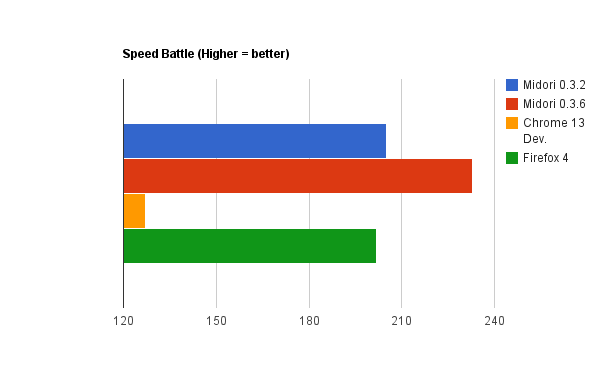
Now on to the benchmarks. Each of the following tests were run three times, with the average score is presented below.The results shouldn't be taken as definitive but do help to gauge Midori's place amongst other browser.

Taking a quick look at the results of standard online benchmarking suites we can see that 0.3.6 bumps Midori up in the speed stakes – almost rivalling Firefox 4 in the V8 JavaScript benchmark.

V8 (Higher = better)


Speed Battle (Higher = better)


Download


Midori 0.3.6 can be downloaded as source at twotoasts.de or installed/upgraded using a combination of the Webkit and Midori PPAs.

Midori is also available via a standalone installer for Microsoft Windows at twotoasts.de.


Source

Ubuntu 11.10 release schedule


The tentative release schedule for the Ubuntu 11.10 development cycle has been made available.

As with all release schedules the dates listed below are subject to change. If you’re landing on this page in July, August or even October you are advised to refer to Schedule" onclick="javascript:_gaq.push(['_trackEvent','outbound-article','wiki.ubuntu.com']);">wiki.ubuntu.com/OneiricReleaseSchedule to see the most up-to-date version.

For folks in the ‘now’ the dates bound for your diary’s/calendar apps are: -
  • June 2nd Alpha 1
  • June 30th Alpha 2
  • August 4th Alpha 3
  • September 1st Beta 1
  • September 22nd Beta 2
  • October 13th Ubuntu 11.10

A fanboy note: Oneiric will be the second release of Ubuntu to be made available on the 13th, the last being Ubuntu 5.10 Breezy Badger way back in 2005.
  • Ubuntu 4.10 20th October
  • Ubuntu 5.10 13th October
  • Ubuntu 6.10 26th October
  • Ubuntu 7.10 18th October
  • Ubuntu 8.10 30th October
  • Ubuntu 9.10 29th October
  • Ubuntu 10.10 10th October


Source

‘Confity’ lets you configure Ubuntu 11.04 Unity easily


Several days back we featured a rather useful app called ‘GUnity’ that gave you an easy way to tweak the Unity desktop to your liking. Confity’, pictured below, is a similar application that follows the same ‘ethos’ as GUnity, only this tool provides a lot more bang for your proverbial free buck…

Confity running in Ubuntu 11.04

What can it do?


Confity can do most of what Gunity can: you can adjust the launcher size, change shortcuts for the Dash and command prompt, reduce or increase the panel opacity, etc. Better yet it has features that GUnity doesn’t, including options to add quicklists to popular applications with one click and disable or enable system tray applets (Shutter, etc) with one click.

To get even more enthusiastic about it I can’t help but appreciate the inclusion of an ‘undo’ button for many of the options; if you don’t like the changes applied you can revert just as easily as you enabled them.

Editions


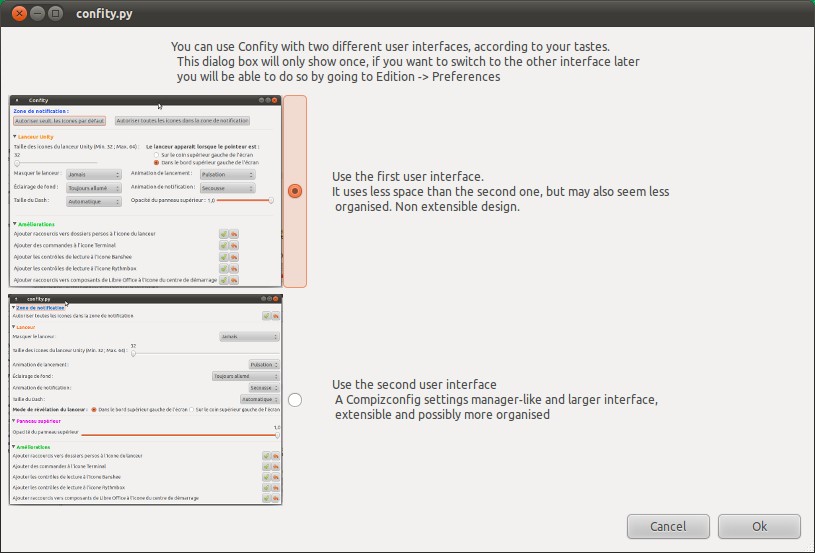
One area where Confity lose points is in its startup. Before you can do anything you’re told to pick one of two layouts, neither of which differ in anything but layout.

Confity interface options

Whilst this ‘choice’ may be appreciated by some it seems a needless inclusion. Just my 2 cents.

Download


Confity is available to download as a source package and as a pre-packaged .deb file for Ubuntu 11.04 from the project page @ sourceforge.net/projects/confity

The latter of these, due to the developers first attempt at Debian packaging, will kick-up a minor fuss about being ‘badly packaged’ when installed through the Software Centre.


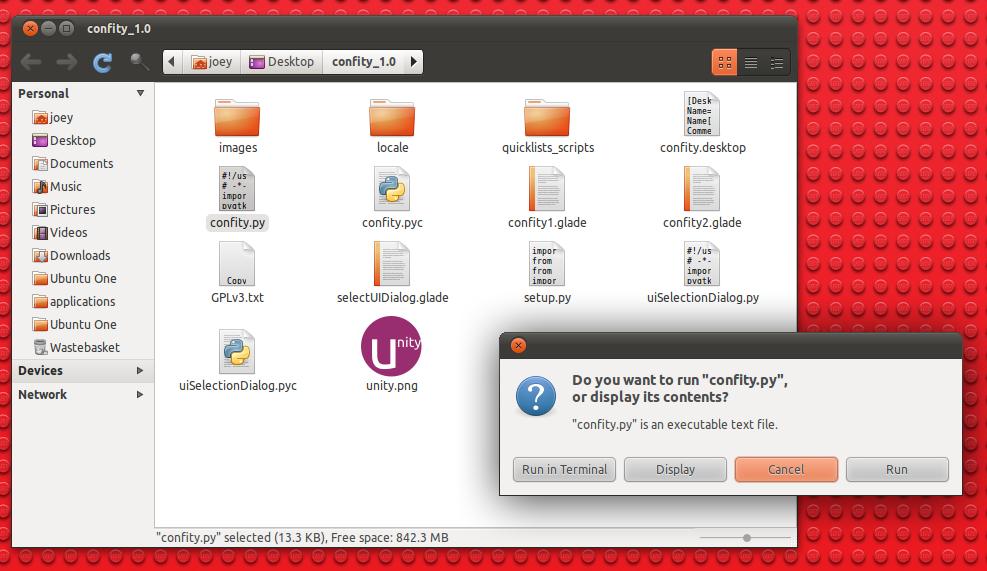
You can choose to ignore this at your own risk. Alternatively the application can be downloaded as source, extracted and run from its folder by double-clicking on the ‘confity.py’ file inside.

Confity can be run from its folder


Source