2011-05-21
Neo, meet Ubuntu [Video]
The following Windows-mocking sketch by comedy website CollegeHumor has been knocking around for a while but I’ve only just seen it myself.
Reimagining ‘The Matrix’ series of movies running on Microsoft Windows, the gags are predictable but nonetheless funny. Stick with it to the end for a shout out to Ubuntu.


Add Ubuntu One style dark toolbars to all apps in Ubuntu
It has been two weeks to the day since I shared my enthusiasm for DeviantArtist SimplyGreat’s ‘UbuntuOne style Nautilus-Elementary theme’.
I still love his work – which gives Nautilus-elementary users an ‘UbuntuOne’ themed file browser toolbar – but what if you want to extend this ‘look’ throughout all of your GTK+ applications? That’s where this post comes in.

Global dark toolbars
Put together by Dashua, the following Natty-only PPA contains a modified version of the Ubuntu light themes that applies this ‘dark toolbar’ style to all of your installed GTK+ applications.
Also provided via Dashua’s PPA is a patched version of Nautilus-Elementary.
Getting the changes
You can upgrade your version of Ambiance and Nautilus with these unsupported changes by adding ‘ppa:dashua/ppa’ to your software sources. Don’t know how to do that? See here.
Once added, run the ‘Update Manager’ to apply the relevant updates. Select ‘Ambiance’ in the ‘Appearance Properties’ window for the theme to take effect. You may need to log out and back in in-order for changes to Nautilus to appear.
Also note that this version of Ambiance has ‘Faenza’ set as the default icon set. If you don’t have the Faenza icon pack installed just click the ‘customize’ button in ‘Appearance Preferences’, go to the ‘icon’ tab and choose an icon set of your choosing. The default ‘Ubuntu icon set’ is ‘Ubuntu Mono Light’.
Tip via NerdyKid
[How to] Convert Ubuntu into ChromeOS (kinda)
Whether the hype surrounding Google’s soon-to-launch ChromeBooks has left you wanting a piece of the action, or whether you’d just rather have a “quickboot” interface for Ubuntu that gets you on the web in seconds, the following ‘conversion’ guide may prove useful.
cdn.omgubuntu.co.uk/wp-content/uploads/2011/05/Screenshot-1-r95.jpg" >
 Chrome OS is, in the simplest of simplistic terms, a browser running atop a Gentoo base. Not as fancy as one might have expected, nor is it that difficult to ape thanks to a great many of ChromeOS’ features being features within the browser itself.
Tutafuta - which my mind insists on reading as tooty-fruity for some insane reason – have put together a neat how-to on transforming Ubuntu into a ChromeOS-style environment.
The result is by no means a perfect match – features, usability and speed from power-on to google-dot-com will be noticeable between the OS proper and this make-shift version.
But that’s missing the point. This is about getting some of the best bits of ChromeOS atop a more powerful, accommodating base such as Ubuntu.
The guide can be found and followed @ tutafuta.com
Evolution 3.0 now available for Ubuntu 11.04 GNOME 3 users
Evolution 3.0 is finally available for Ubuntu 11.04 GNOME 3 users to install, thanks to danilo.
Evolution 3.0 for GNOME 3 doesn’t differ greatly from Evolution 2.x as found by default in Ubuntu 11.04 – at least not on the surface. But if you’re using GNOME 3 in Ubuntu you might as well be using the latest version of its default mail application, too.
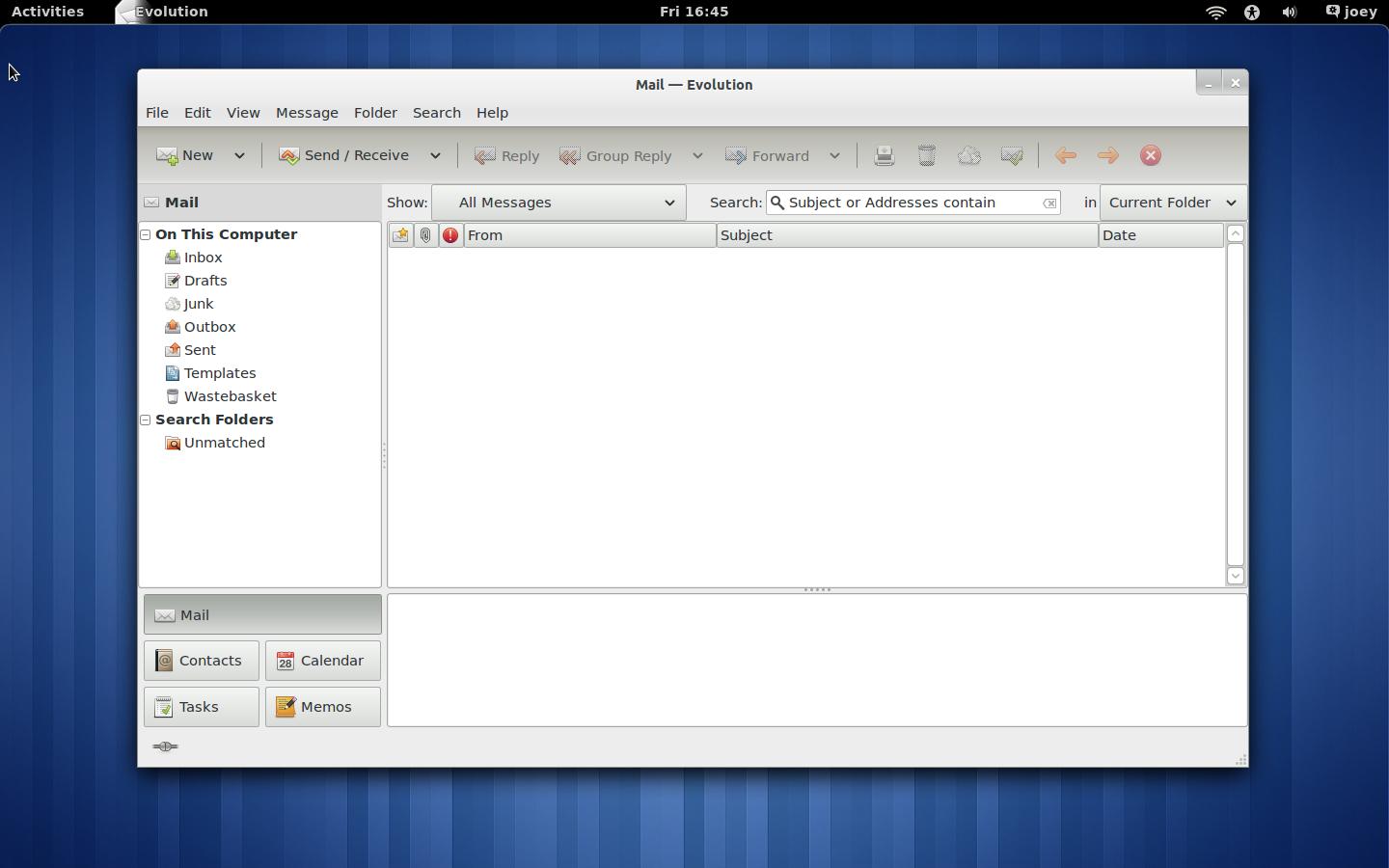
With Evolution requiring dependencies from the GNOME 3 PPA Ubuntu 11.04 Unity users cannot use this PPA.
Add ‘ppa:danilo/evolution’ to Software Sources, accessible via The Ubuntu Software Centre, and then run Update Manager to upgrade Evolution to version 3.0.
To reiterate: this is not available for Ubuntu 11.04 Unity users only those with GNOME3/Shell installed via the GNOME 3 PPA.
2011-05-16
Mark Shuttleworth UDS Interview [Video]
The Ubuntu Developers YouTube channel has uploaded a new video interview with Mark Shuttleworth, recorded earlier this week at the Ubuntu Developer Summit, currently taking place in Hungary.
In the twenty-minute long interview he talks about his strategy on reaching 200 million Ubuntu users by 2015 and what users can expect in Ubuntu 11.10 and Ubuntu 12.04, as well as touching upon the job of managing a project home to so many differing views and preferences.
Video editor PiTiVi to be removed as default app in Ubuntu 11.10
GNOME Video Editor ‘PiTiVi’ is to be removed from the default application set in Ubuntu 11.10, a discussion at UDS has decided.
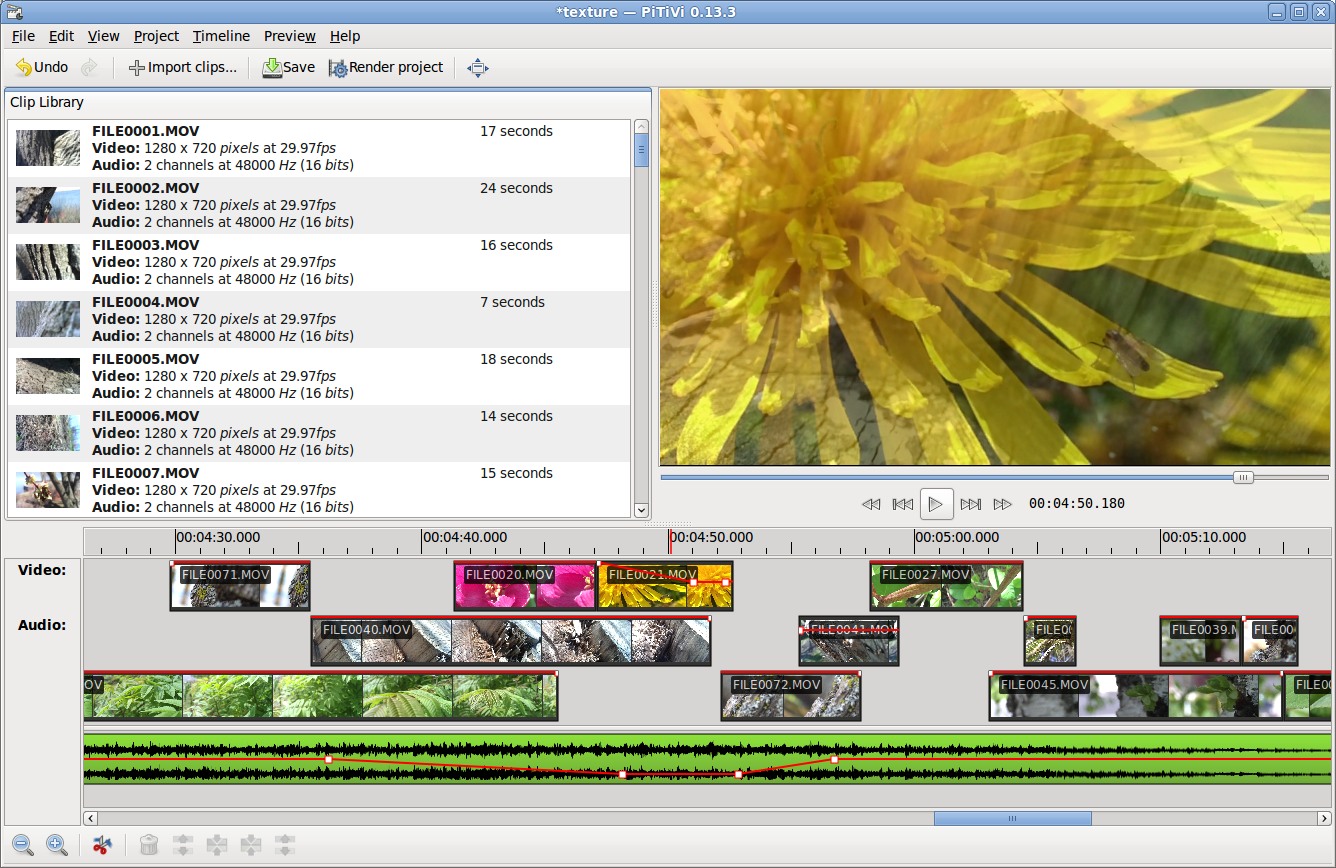
PiTiVi, which was first added to the default application lineup in Ubuntu 10.04, was removed in light of its poor reception – currently garnering a mere 2.5 star rating in the Ubuntu Software Centre – as well as its lack of fit with the default user-case for Ubuntu.
The lack of ‘polish’ and maturity to the application was also highlighted, with one attendee wondering whether its ‘basic’ nature impacted negatively on the perception of the Ubuntu desktop as a whole.
Whilst no video editor will replace it, PiTiVi, Kdenlive and OpenShot will all be installable via the Ubuntu Software Centre.
App changes for Ubuntu 11.10: See ya, Computer Janitor and Hello Deja Dup!
Few changes are to be made to the application line-up in Ubuntu 11.10.
Backup tool ‘Deja Dup’ will be ‘new’ to the application line-up. Mozilla Thunderbird has been tentatively marked for inclusion pending CD space concerns and other issues being resolved ahead of October.
A ‘hardare information’ application was also discussed for inclusion, with options on who best to provide this to be looked at.
Leaving the default install will be video editor PiTiVi and

Computer Janitor: marked for removal
LibreOffice removal mooted
Also discussed at length during the UDS session on default applications was the potential case for removing LibreOffice from the default CD.
No formal decision on removing the suite was taken, with the developers noting that the purpose of the discussion was simply as it it was on their ‘list for examination’ rather than the talk being a sign of intent in dropping it ‘soon’.
Reasons put forward in favour of its replacement at some point in the coming cycles included the relative large size of the application both on the CD and delivered on so-called ‘Zero-day upgrades’; the inconsistent user interface and the perceived ’lack of use’ by many Ubuntu users.
The reasons on keeping the suite were more convincing. The strong selling point of Ubuntu shipping with a ’Microsoft-Office compatible Office app’ was noted, as was the likely popularity of the suite with “no-we’s” (i.e. non-developers.).
LibreOffice also, like Firefox and VLC, carries brand recognition across platform – a strong selling point in assuaging the concerns of casual, tempted new users.
One proposed ‘solution’ was to have a ‘LibreOffice’ installer placed on the desktop/Unity launcher for users wishing to add the suite to easily do so. Kubuntu has a similar approach with Firefox, not shipping it by default but shipping an installer for it.
[How to] Make e-book app ‘Calibre’ look nicer in Ubuntu
It’s always frustrating to come across an applications whose features are let down by a less-than great interface. Calibre, an e-book management tool, has, for me at least, been a prime example of this.
Thankfully the developer has begun working to tweak and refine the interface, with the fruits of this labour appearing in the most recent release. Reader and all round ace guy Wyatt K., having read that post, thought it could be made better still – and all rather easily, too…
“On your Calibre post there were several comments about the terrible icons. Since this is a sentiment I share — and since I want a beautiful desktop — I decided to do something about it. This is what I ended up with:

Fortunately, changing the icons in Calibre is super easy. There’s a folder of the icons used by the application inside the resources file. For anyone interested, here are the steps to get Calibre looking even better:
- Download the replacement image file here: http://dl.dropbox.com/u/2444329/images.zip
- Open terminal, type gksu nautilus. A new nautilus window with root privileges will open.

- Navigate to the location in which you installed Calibre. By default this is located at ‘/opt/calibre/resources’
- Rename current images folder to something like “images-backup”
- Copy new images folder from wherever you extracted it into the ‘resources’ folder
- Launch Calibre
If everything worked, you should now see beautiful Elementary icons everywhere.
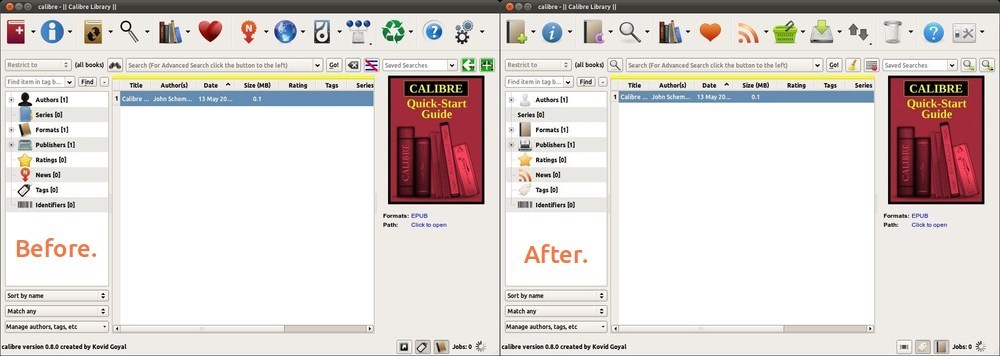
Since Calibre keeps the same file structure everywhere, this same process works on both PC and Mac, the only difference being the actual location of the resources directory. There are still a couple things that need to be done to make this replacement perfect. As yet, there are no good device icons for e-readers in any of the well-known icon sets.
If someone has some, send them along to kirby.wa [at] gmail [dot] com and I’ll update the .zip.
Credit goes to DanRabbit for his amazing icons, and Kovid Goyal for his fantastic program.”
And y’know what Wyatt? Credit also goes to you for such a clever tweak.
Desktop YouTube app ‘Minitube’ sees bug fix release
Minitube – the impressive HD-capable and Adobe Flash-free desktop YouTube player for Windows, Mac and Linux – has seen a new ‘bug fix’ release this morning.

Fixes present in the 1.4.3 release include: -
- Toolbar and playlist now hide when in fullscreen
- Status bar volume level no longer displayed in decibels
- Search box no longer disabled when in fullscreen on Linux
- New and updated translations
Minitube is a free download for Linux and binaries – which simply require one-click to run – are available from the Minitube website @ flavio.tordini.org/minitube
A PPA is also maintained by Ubuntu member Christian Mangold. Just add ‘ppa:neversfelde/minitube’ to your software sources to upgrade or install ‘minitube’ from.
Windows and Mac users are also able to use the application for free, but a "full" version with all of the features unlocked is available for purchase.
2011-05-12
Microsoft purchasing Skype – what could this mean for Linux?
Update: Microsoft have since released a statement assuring that they will continue to ‘invest and support non-Microsoft platforms.’
Microsoft are to close an estimated $8.5 billion deal to acquire internet-telephony service Skype, allthingsd are reporting.

Skype – with a reported 600 million user accounts – is one of the most popular cross-platform desktop VoIP applications currently available.
Microsoft purchasing it would give Microsoft an unparalleled foothold in the desktop communication market overnight thanks to their already dominant position with Windows Live Messenger.
But what would happen to the Linux client?
Likely nothing.
Part of Skype’s success is that it is accessible to users of various operating systems. Yanking support for a Linux client would cut off millions of Linux Skype users, thus affecting their Windows and Mac OS contacts too. Not to mention that thousands of those Linux users are paying customers; and the purchase of Skype wasn’t done out of an altruistic epiphany on the part of Steve Ballmer.
Microsoft will likely be keen to have input in the design and development of Skype – potentially merging it with one of their own products – and this will take time to achieve.
The development of Skype’s Linux client has been slow, bordering on static, for a long time. One would guess that unfortunately this acquisition also wouldn’t see that sped up overnight, a shame for Linux users who feel they’re missing out on the features prevalent on other platforms.
As edlt points out below: “We’ll continue to not get updates!”
Ars Technica via WSJ
Lubuntu made ‘official Ubuntu derivative’

After what seems like an eternity of waiting, the light-weight LXDE based Ubuntu spin ‘Lubuntu’ has been granted ‘official’ Ubuntu family status.
Lubuntu 11.10 will be the first fully supported release, with its desktop packages made available in the Ubuntu repositories for users to install alongside their chosen desktop environment - as is currently the case with Kubuntu and Xubuntu.
It is hoped the move will see Lubuntu achieve greater visibility within the community and beyond.
Lubuntu is a lightweight Linux distribution based on Ubuntu that is aimed at computers with comparatively ‘low’ hardware.
A formal announcement on the decision is expected later today.
Source
Plans for greater Unity app integration in Ubuntu 11.10
Ubuntu 11.04 brought with it a shiny new Launcher with shiny new capabilities, such as the ability to display progress bars, count badges and quicklists on application Launcher icons.
Although Ubuntu 11.04 didn’t see the default application take advantage of these features to any great degree plans are afoot to provide Oneiric’s default apps with Unity integration from the get-go.

Default applications
So what can we expect to see? Based on discussion at UDS: -
Gwibber already has Quicklist support in Unity but will benefit from an unread tweet/message count in Ubuntu 11.10.
Update-Manager will receive an update count, progress bar and quicklists containing items such as ‘check for updates’, etc.
Banshee won’t gain player controls in its’ quicklist but ‘media sources’ – as currently found in the Banshee sidebar – will be entered. A progress bar for music and podcast download will also be looked into.
Dynamic quicklists – as seen in AWN and Docky – have been suggested for use with Nautilus, with its quicklist containing user shortcuts and favourites. Progress bars to relay something transfer/copy status are also being mooted.
Other integration changes planned include control items in Transmission’s Quicklist and progress bars for Brasero – and the Ubuntu Software Centre.
Simple quicklists are also proposed for Gedit, the Terminal, new default backup ‘Deja Dup’ and movie player Totem.
Quicklists for other apps
Filling in the gaps for non-default applications has been the community at large, diligently adding Unity-launcher support to their favourite applications.
Ubuntu are keen to get help creators of 3rd party quicklists for their application get the changes into the relevant Ubuntu packages/upstream so that everyone can benefit from them.
Subscribe to:
Posts (Atom)