2011-05-01

Banshee 2.1: Small version increase, big change


With the fantastic 2.0 release behind it, the Banshee project announces changes for the future.

Dependencies, why do I care?

In a mailing list posting today Banshee Core developer Gabriel Burt announced the much anticipated dependency decision for the upcoming Banshee 2.1. For every release so far the policy for Banshee has been to support distributions going back roughly 1½ years: this is all about to change.

The reason naturally being the arrival of the GNOME3 stack and the .NET worlds new GTK#3 bindings which will hopefully soon see its first release. Rather than supporting the legacy (and known limited) GTK#2 bindings the decision to make a clean break, allowing the first major refresh of Banshee in years and simultaneously allowing Banshee to drop a lot of legacy code and workarounds.

Besides moving all of Banshee to GTK#3[1][2], the targets to be dropped include the old and unsupported iPod integration (which was replaced with the standardized libgpod bindngs in the 1.7/1.8 cycle by Alan McGovern and friends) and the old style HAL hardware backend (which was replaced with udev likewise during the 1.7/1.8 cycle).

What happens to older Linux releases, like my Lucid?

While Banshee’s range of PPA resources are likely to continue merely providing the dependencies, a new bundle of joy has been added to the family. Older Linux users are now granted 32 and 64 bit generic bundles of Banshee which will run on any older Linux distribution, while integrating with your systems GStreamer media support framework and theming.

All fantastic work done by silent yet deadly handsome (and camera shy) Luxembourgian Banshee Core maintainer Bertrand Lorentz. As something new these releases will for the first time be distributed from the GNOME servers rather than Banshee’s own domain.

Moar GNOME, less C plz!

Aside using the very latest GNOME technologies and cutting out legacy code with the ruthless efficiency known only to true code ninjas, Banshee is aiming to obsolete the remaining bits of C code.. what.. no C, why? The answer is simple, C code is an order of magnitude harder to work with, especially within a managed code project such as Banshee.

Unmanaged code such as C code makes the portability wins from .NET much harder to attain as is evident in the Windows editions lack of e.g. Ubuntu One Music Store or Amazon MP3 integration. With Banshee 2.1 all this code is going to be replaced with new .NET bindings for the underlying libraries, the way mother intended code to be used, and will bring equal functionality and increased stability to all platforms.

Google Summer of Code 2011?

Banshee is also participating in Google’s annual bonanza of code and glory, this year we have gotten the pleasure of working with student Tobias Arrskog who will be working on uPnP server and client integration under Banshee luminary Alexander Kojevnikov.

Tobias has already begun introducing himself to the community and getting used to the Banshee culture and you can all look forward to hearing more about his progress as GSoC progresses.


Source

Linux Video editor KdenLive updates with rotoscoping, stop motion, light graffiti effects and more


Qt video editor Kdenlive saw a new release yesterday – one which stars a bona-fide A-list of new user-orientated features.

We’ve taken a pick of the new and notable and listed them below…

Light graffiti


A feature new to version 0.8 is the excitingly named ‘Light Graffiti’. This feature allows you to record yourself ‘painting with light’. All you need is a dark-ish environment and a brightly-lit implement. Being one of those subjects that is much easier to ‘get’ when ‘seen’, here’s a video: -


Stop motion tool


Sure to be a hit with all amateur animators out there is Kdenlive’s new ‘Stop Motion’ utility.

Whilst the feature is currently confined in support, limited to capture via Black Magic Intensity HDMI cards, it does offer an excellent set of features many dedicated stop-motion applications already available for Linux lack.

It can display a live preview,  provides an easy ‘capture’ button to grab an image and is also able to overlay the last captured frame ‘on the monitor to easily see the difference with current live feed’.

Other features


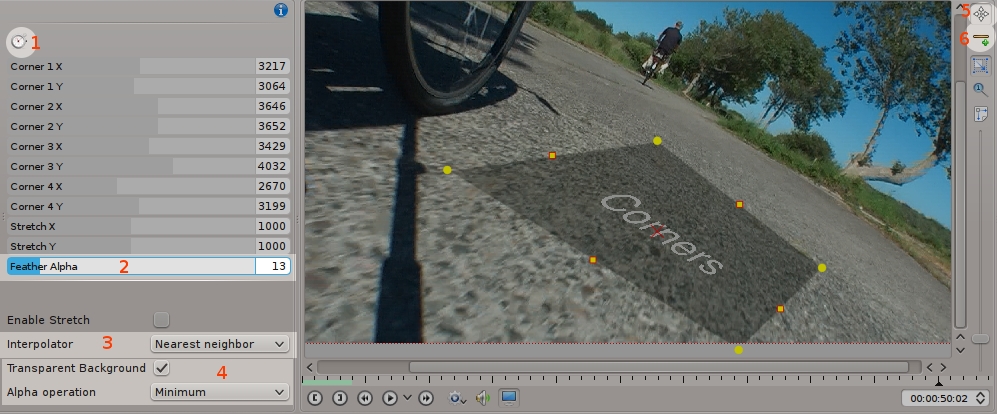
Notable new additions elsewhere include rotoscoping masks and ‘image perspective placement’ – both with vital feathering options; a new audio monitoring tool for spectrum analysis; and saveable widget layouts to make working with Kdenlive a tuneable experience.
Perspective image placement in Kdenlive 0.8
Perspective image placement in Kdenlive 0.8. (source: Kdenlive.org)

More features, along with news on bug fixes and other additions, can be read in the release notes for this release @ kdenlive.org/discover/0.8

Download


With so many great new features present in Kdenlive 0.8, the app certainly usurps the mantle as the most featured yet user-friendly video editor available for Linux.

It’s also pretty awesome in the Ubuntu-support department too, being available for Ubuntu 9.10, Ubuntu 10.04, Ubuntu 10.10 and Ubuntu 11.04.

To install in any of the above versions just add ‘ppa:sunab/kdenlive-release’ to your software sources, update and then install Kdenlive from the Ubuntu Software Centre.


Source

Our complete guide to Unity in Ubuntu 11.04


Over the last couple of weeks we’ve been quietly working on a new release feature that we’d like to do for every Ubuntu release.

A full on guide to new features in Ubuntu.

Unity in Ubuntu 11.04 marks a radical change from the default GNOME 2.x environment everyone has become familiar with over the past 13 Ubuntu releases. For some who have followed the development and may have even been running Natty since alpha, the Unity environment will be something you’re used to.

For the many others who are upgrading, there will probably be a lot of confused faces – especially seeing as Unity has many features that are a boon to productivity but aren’t particularly discoverable, such as rearranging items on the launcher, the new hidden global menu for applications, and also launcher keyboard shortcuts.

So we took the time to compile a guide for Unity in Ubuntu 11.04 that covers all of these little usage tips and more – we chucked in a bit about the Software Center, the new indicators in the panel, and explained exactly what Unity is and why it’s the default in Ubuntu.

We hope you’ll enjoy the guide, and even if you don’t find Unity hard to learn, there are sure to be people who do – so share it, tweet it, link to it on Facebook and make sure that everyone upgrading to Ubuntu 11.04 tomorrow isn’t doing so blind.

You can visit the guide at anytime here: omgubuntu.co.uk/natty

Thanks!


Source

The Official Ubuntu 11.04 disc artwork

Canonical may have nixed the ‘Ship It’ resource that supplied individuals with a free CD of Ubuntu, but professionally printed CDs remain available for purchase via the Canonical Store.

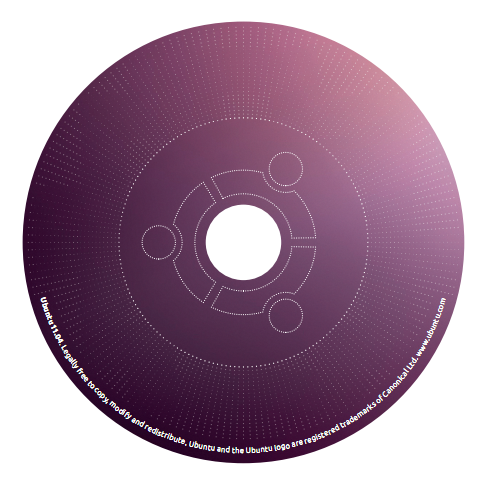
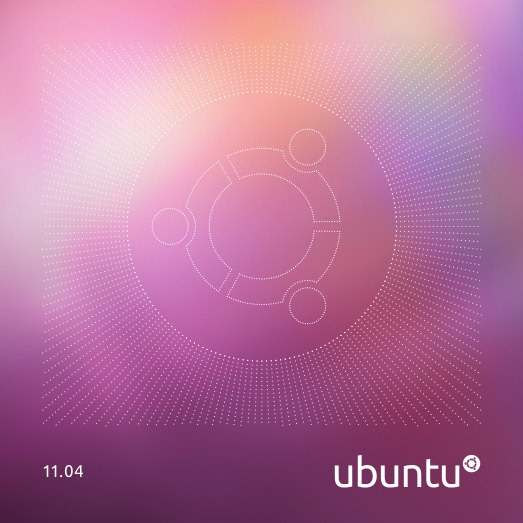
To help tide us all over until the Ubuntu 11.04 discs go up on sale we thought we’d share with you the new artwork the 11.04 disc will be using  -courtesy of Canoncial’s Kate Stewart and Iain Farrell.

Front cover

CD-cover

Disc:

image

Back of the case

CD-Back

Here are the previous 4 covers for comparison: -

Untitled-1

As soon as the discs go on sale we’ll be letting you know.


Source

Follow Ubuntu 11.04 reactions in our information Hub (update: back on)


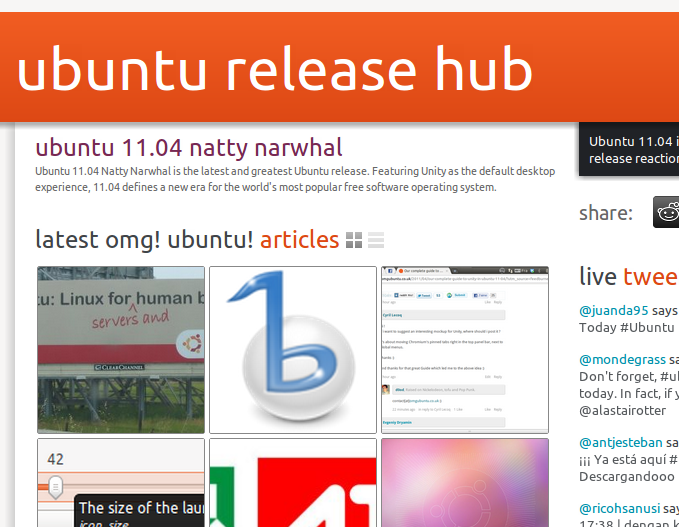
Come Ubuntu release day, there’s so much stuff happening it’s often hard to keep track. There are new articles popping up on OMG! Ubuntu! throughout the day, reactions on Twitter and Identica, friendly banter and speculation in the #ubuntu-release-party IRC channel and constant refreshes of www.ubuntu.com to see if the release is, in fact, released.

Well we’ve taken all of this goodness and put it into what we’re dubbing “The OMG! Hub.” Let me introduce you.

So what does it do?


Well we’ve taken all of this goodness and put it into what we’re dubbing “The OMG! Hub.” Let me introduce you.

Head on over to omgubuntu.co.uk/hub/natty and you’ll be greeted with a customizable landing page full of aggregated information such as…
  • The latest OMG! Ubuntu! articles
  • Release reaction tweets and dents from the #ubuntu or #natty hashtags
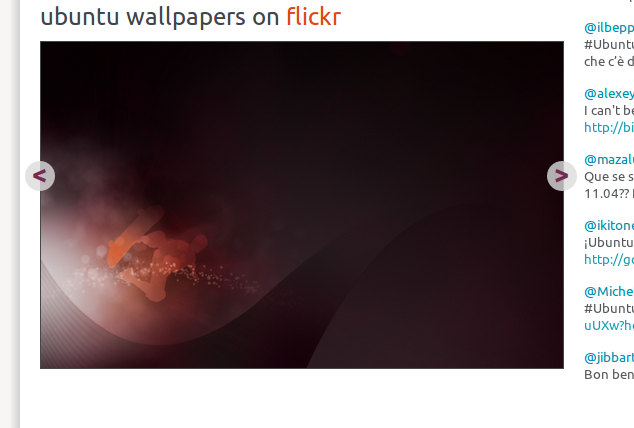
  • The coolest Ubuntu wallpapers from Flickr
  • An embedded IRC webchat hooked up to #ubuntu-release-party and #omg!ubuntu! for you to get your groove on.


Nifty, huh?

The best thing is that each module is movable and saved in a cookie – so if you want webchat at the top of the page, simply drag it up there. Don’t care so much for tweeters? Move the Twitter stream down the page.

This system was designed by me way back at the end of last year to be used as an Ubuntu Developer Summit hub for UDS-N last year. Unfortunately we never got around to building it until our wonderful web developer Richard Lyon joined the Ohso team last month.

We’re giving the system a bit of a test run today to see how it copes.


But all this for 2 days a year?


The real purpose of The Hub is to serve attendees and remote participators at open source conferences like the Ubuntu Developer Summit, DebConf, Linux.conf.au, GNOME summits and more, making their life that much easier during what is normally a very busy time.

Look out for The Hub throughout the year – but in the meantime, we’d love it if you could check it out and tell us what you think. As usual, the best place is on Get Satisfaction – but we don’t mind if you just want to post something in the comments below.

Plans for the future


The Hub is very much alpha software right now, and amongst bug fixes we have the following features to add over time:
  • Redesigned IRC webchat
  • Session schedule module with localized times
  • Video module
  • Gobby/Etherpad document tracking
  • Session reminders

Enjoy, and don’t forget to share it with your friends!

No related posts.


Source

Ubuntu 11.04 released, reviewed

It’s finally here: Ubuntu 11.04 is available for download.

button

The “big talking point” of this release has been the switch from the traditional GNOME desktop to Unity – Canonical’s (originally) netbook-orientated interface.


Sporting a left-sided launcher, slick new ‘lenses’ for application browsing and launching, putting ‘application menus’ in the desktop panel, and retiring the traditional notification/system tray area,  it’s all too easy to feel scared or uneasy about switching to Ubuntu 11.04.

But don’t.

The interface has been designed by experts; the interface has undergone user testing and the features implemented are designed to make using your computer easier, not harder. Sure it’s different – but different doesn’t mean bad; the best thing to do is to give it a chance.

If you’re coming to Ubuntu without baggage then welcome aboard – you’re going to love your journey!

New Features


With an entirely new interface present in Ubuntu 11.04 listing all of the ‘new features’ present would be an exhaustive task. We put together a neat over-view page of Unity that better explains many of the key new features in detail.

You can read that @ omgubuntu.co.uk/natty

Software


As usual Ubuntu ships with a tonne of software pre-installed. There are a few changes to the line-up over the previous release of Ubuntu, but nothing too drastic.

For office-suite needs Ubuntu comes with the Microsoft Office compatible LibreOffice suite. This is a capable suite of applications that, whilst not blending with the native look of Ubuntu too well, remain a desktop must-have.

Shotwell photo manager and editor is present. Recently updated the application lets you ad, tag and sort your photos easily. Of note is the social network publishing support for Flickr, Facebook, etc. This works flawlessly once set up.

As with releases past all users are eligible for 2GB of free Ubuntu One cloud storage. Setting up and managing this feature is made much easier in Ubuntu 11.04 thanks to the streamlined, albeit OS X-esque ‘Ubuntu One Control Panel’.


The default music player is now the insanely popular Banshee media player. This puts integrated Amazon MP3 and 7Digital music stores right on your desktop, provides Sound Menu integration and, to be superficial, finally gifts Ubuntu with a modern, looking music player.

The Ubuntu Software Centre is available, making installation of thousands of apps available via ‘one click’. New to the store in 11.04 is the addition of user-submitted application ratings and reviews. A much longed for, and very helpful, aid in deciding whether something is worth installing or not.

The default browser has been bumped up to Firefox 4; Evolution remains the desktop e-mail application of choice; and

Conclusion


Ubuntu 11.04 with its new interface is certainly what many would call a ‘game changer’. Making better use of screen space, intuitive interface layouts and, most importantly, making a desktop that works for the user and not in spite of them.

Ubuntu was once dubbed ‘Linux for human beings’. Spend a few minutes using Unity and that slogan will never have sounded truer.


Source

AMD ATI release Catalyst 11.4 driver


AMD have released a new version of their graphics driver Catalyst for Linux. The new version, 11.4,  contains back-ported X.Org Server 1.10 support in order to function with Ubuntu 11.04, Fedora 15, Arch Linux, etc.

While X.Org Server 1.10 has been out since February, AMD missed supporting it until it came time for Ubuntu 11.04 and then late last month they ended up dropping a Catalyst 11.4 pre-release to Ubuntu Natty users.

The Catalyst 11.4 Linux driver also offers the first bits of AMD PowerXpress support under Linux, but it’s clunky in that the X.Org Server needs to be restarted when switching graphics adapters. This implementation is meant for switching between Intel and ATI Radeon graphics.

This driver also provides support for Red Hat Enterprise Linux 5.6 and SuSE Linux Enterprise Desktop 10 Service Pack 4. The Catalyst 11.4 Linux driver also has at least one fix for Wine.

Download @ amd.com


Source

10 things to do after installing Ubuntu 11.04


So you’ve downloaded or upgraded to the latest release of Ubuntu – the nominal Natty Narwhal – but what now?

As is now tradition around these parts, we present you with a list of 10 post-install tips/ideas to make your time with the Narwhal less of a splash in the deep end and more of a serene swim


1. Read about the new features


Ubuntu 11.04 comes with so many new features and tricks that it’d be all-to-easy to miss some out. So we’ve put together an awesome primer guide on Ubuntu 11.04 for those new to Unity.

Check it out at omgubuntu.co.uk/natty

2. Run Update Manager


Even the Ubuntu team isn’t perfect – and chances are there may have been some last minute updates added to Ubuntu after the ISO you downloaded was built.

Run Update Manager by searching for it in the Dash and you’ll be sure to have the most up-to-date minty fresh version of 11.04

3.  Install restricted extras


Due to legal reasons, Ubuntu can’t ship things like patent-encumbered codecs for playing back things like MP3s, .WMV videos or encrypted DVDs.

Thankfully, the Ubuntu installer lets you check an option during install that adds at least some of these missing codecs to your system.

If you didn’t check the ‘Install 3rd party codecs/restricted drivers’ during the installation of Ubuntu 11.04 then these steps are important for enabling all of the “not-shipped-ware” that provides you with a comfortable, stress-free time in Ubuntu.
Graphics

Ubuntu should automatically detect and alert you that 3D drivers are available. If so, you will see a ‘circuit board’ icon appear on the top panel. Click this and follow the prompts.

If Ubuntu fails to alert you (be patient as this isn’t always instant) then you can manually run it by opening the Application Lens and searching/browsing for ‘Hardware Configuration Tool’.
Codecs & restricted formats

“If music be the food of Gods, then play on!” wrote Shakespeare. I’m guessing that whilst you’re (probably) not a god you still enjoy your music almost as much as your food.

MP3, M4a and a variety of other codecs can be installed in Ubuntu 11.04 with one click: -

image

4. Grab some useful indicator-applets


Ubuntu 11.04 Unity dispenses with the traditional GNOME desktop panel and notification/system-tray area. This means familiar/favourite applets – such as CPU guages, move eyes or panel-bound bloggers – can no longer be used.

But not to worry!

There are a tonne of much-more-useful and much-more-consistent Indicator Applets available. You can add everything from Weather applets, RSS readers and Clipboard managers to timers, screen-saver inhibiters and system monitors.


See ‘The OMG! Ubuntu! guide to awesome indicator-applets’ for screenshots, info and installation instructions for over 16 indicator applets.

5. Find more apps in the Ubuntu Software Center and swap out the defaults


‘One size doesn’t fit all’ is an over-used, albeit spot on, adage; If Banshee isn’t music to your ears; PiTiVi is too basic for your movie-making needs; or you’re intimidated by LibreOffice’s arsenal of apps then Ubuntu makes it easy to find and install alternatives.

Popular choices include:
  • OpenShot for an ‘iMovie’ style video editor
  • AbiWord for a simple, lightweight word processor
  • Thunderbird e-mail application
  • Chromium web browser in place of Firefox 4
  • Pidgin in place of Empathy

Don’t know how to install apps using the Software Center? Watch this video:


6. Swap the interface

Classic GNOME in Ubuntu 11.04

Not a fan of Unity? Don’t fret. You can use the “Classic Ubuntu” desktop by selecting it at login time.
  1. Log out to the login screen
  2. Click on your name
  3. Look for the session menu at the bottom of the screen
  4. Change it from “Ubuntu” to “Ubuntu Classic”
  5. Click log in.

natty classic-w1000
Unity 2D – a Qt built alternative to Unity

Unity 2D is available for users who fail to meet the graphics requirements. It’s light, responsive and boasts many of the same features as its elder sibling.

downloads
GNOME 3 / GNOME Shell in Ubuntu 11.04

Gnome 3/Shell is available via PPA, although use of it does break Unity – so add it only after due consideration!

7.  Set up Ubuntu One file sync


Ubuntu One provides all Ubuntu users with 2GB of free online storage space that allows you to back up and sync any files or folders you wish, along with your Firefox bookmarks, Tomboy notes, Evolution contacts and Ubuntu Music Store purchases between computers.

Click the Ubuntu One icon on the Unity Launcher to get started.

8. Follow the reactions to Ubuntu 11.04 in OMG! Ubuntu!’s new “Hub”


Come Ubuntu release day, there’s so much stuff happening it’s often hard to keep track. There are new articles popping up on OMG! Ubuntu! throughout the day, reactions on Twitter and Identica, friendly banter and speculation in the #ubuntu-release-party IRC channel and constant refreshes of www.ubuntu.com to see if the release is, in fact, released.

Head on over to omgubuntu.co.uk/hub/natty and you’ll be greeted with a customizable landing page full of aggregated information such as…
  • The latest OMG! Ubuntu! articles
  • Release reaction tweets and dents from the #ubuntu or #natty hashtags
  • The coolest Ubuntu wallpapers from Flickr
  • An embedded IRC webchat hooked up to #ubuntu-release-party and #omg!ubuntu! for you to get your groove on.

9. Nautilus-Elementary


It’s a hit with many, many users and it’s back for Natty. Whaddam I talking about? Nautilus-Elementary of course! The sexier, less confusing file manager that strips strip out some of the visual-bloat accompanying stock Nautilus in Ubuntu.

Add it via PPA following the instructions here.

10. Finally…


Finally, to end on a corny note, take some time out to just enjoy using it. Forget about finding and installing new apps or tickling Natty for an hour or so and just use Ubuntu like anyone else would: check Facebook (or Diaspora!) in Firefox, chat to your mates on Empathy, type up that letter in LibreOffice and listen to some music in Banshee.

Ubuntu 11.04 is a bold upgrade from 10.10, so be sure to take some time to get used to it as it comes before changing anything major. You might fear missing a certain application or feature, but most of the changes have happened for a reason: to make Ubuntu easier to use.

And, make sure you tell your friends about Ubuntu, of course!

Pssst!


Whilst we are at it why not subscribe/fan/follow us here at OMG! Ubuntu! to find out about the latest news, cool applications, tips, tweaks, gorgeous themes and wallpapers and a healthy side-serving of opinion and bad jokes? C’mon, you know you want to.


Source

Chrome’s tabs integrated into Ubuntu’s panel? Yes, please!

OMG! Ubuntu! reader Cyrill sent us through a little mockup of what Ubuntu would look like with tabs inside the panel.

He says “On my netbook’s 10 inch screen, every single pixel is important. And as there is barely no global menu for Chromium (this changed apparently in Natty), i was wondering how it would look if tabs were using that free space.”


I have to agree with him – the tabs do look pretty nifty in the panel and vertical screen space on my Dell Mini 9 is a rare and precious commodity. I find myself endlessly punching “Fn + Alt + F11″ to switch back and forth between fullscreen browsing mode while surfing the net’ on the tiny 8.9″ screen.

And apparently Cyrill isn’t the only one who has had this idea – over in the the Ubuntu Forums kenpuu asks if there is any way to put Chrom(ium)’s tabs in the panel, and on Reddit, edjca again asks “What if Chrome’s tabs integrated like the Unity bar?”

Certainly this idea isn’t completely out of the realm of feasibility – Chromium developers have usually been pretty good at working on integration for their browser in Ubuntu.

What do you guys think?


Source

Become a Natty power-user in no time using this Unity keyboard shortcuts wallpaper


With Unity installed and all set-up (see our list of ten things to do after installing if you’re at a loss) it time to get ‘comfortable’ in your new surroundings.

This Unity Shortcuts wallpaper, created by the ace ','outbound-article','twitter.com']);" target="_blank">Octavian Damiean, will orientate you to Unity’s ways in no time.

Click on the image to view it super-sized. Right-click to download.


AskUbuntu Via iLoveUbuntu via The How-to Geek


Source

Banshee 2.1: Small version increase, big change


With the fantastic 2.0 release behind it, the Banshee project announces changes for the future.

Dependencies, why do I care?

In a mailing list posting today Banshee Core developer Gabriel Burt announced the much anticipated dependency decision for the upcoming Banshee 2.1. For every release so far the policy for Banshee has been to support distributions going back roughly 1½ years: this is all about to change.

The reason naturally being the arrival of the GNOME3 stack and the .NET worlds new GTK#3 bindings which will hopefully soon see its first release. Rather than supporting the legacy (and known limited) GTK#2 bindings the decision to make a clean break, allowing the first major refresh of Banshee in years and simultaneously allowing Banshee to drop a lot of legacy code and workarounds.

Besides moving all of Banshee to GTK#3[1][2], the targets to be dropped include the old and unsupported iPod integration (which was replaced with the standardized libgpod bindngs in the 1.7/1.8 cycle by Alan McGovern and friends) and the old style HAL hardware backend (which was replaced with udev likewise during the 1.7/1.8 cycle).

What happens to older Linux releases, like my Lucid?

While Banshee’s range of PPA resources are likely to continue merely providing the dependencies, a new bundle of joy has been added to the family. Older Linux users are now granted 32 and 64 bit generic bundles of Banshee which will run on any older Linux distribution, while integrating with your systems GStreamer media support framework and theming.

All fantastic work done by silent yet deadly handsome (and camera shy) Luxembourgian Banshee Core maintainer Bertrand Lorentz. As something new these releases will for the first time be distributed from the GNOME servers rather than Banshee’s own domain.

Moar GNOME, less C plz!

Aside using the very latest GNOME technologies and cutting out legacy code with the ruthless efficiency known only to true code ninjas, Banshee is aiming to obsolete the remaining bits of C code.. what.. no C, why? The answer is simple, C code is an order of magnitude harder to work with, especially within a managed code project such as Banshee.

Unmanaged code such as C code makes the portability wins from .NET much harder to attain as is evident in the Windows editions lack of e.g. Ubuntu One Music Store or Amazon MP3 integration. With Banshee 2.1 all this code is going to be replaced with new .NET bindings for the underlying libraries, the way mother intended code to be used, and will bring equal functionality and increased stability to all platforms.

Google Summer of Code 2011?

Banshee is also participating in Google’s annual bonanza of code and glory, this year we have gotten the pleasure of working with student Tobias Arrskog who will be working on uPnP server and client integration under Banshee luminary Alexander Kojevnikov.

Tobias has already begun introducing himself to the community and getting used to the Banshee culture and you can all look forward to hearing more about his progress as GSoC progresses.


Source

Ubuntu billboard spotted on Highway 101

Mauricio SuescĂșn was taking a cruise along the101, San Francisco Bay Area, when something familiar looking caught his eye.


Breaking all kinds of safety laws he whipped out his camera and caught the ad for posterity/proof and uploaded it to YouTube…


Mauricio SuescĂșn via OMG! Ubuntu! Facebook

No related posts.


Source