2010-12-22

20+ Useful Blogger Widgets and Hacks

Blogger is a great free blog platform that is improving every day. New useful hacks and widgets are being created on a regular basis. Here is a list of some of the very best blogger widgets and blogger hacks that will improve the usability of your blog.


Blogger Hacks

Related Posts Widget
Display related posts beneath each of your blog posts. Links are displayed based on labels given to each post.

Tag Cloud Widget
Display a simple tag cloud in your blog's sidebar. The tags are displayed based upon the labels given to each post.

Random Posts Button
This widget creates a link for your template that directs users to a random post when clicked on.

Change the Favicon
Are you tired of the regular organge favicon provided by blogger? This tutorial will teach you how to display your own customized favicon.

Top Commentators Widget
Reward your readers for commenting on your blog with this widget. The widget displays the names of the top commentators and will direct you to their website when clicked on.

Change the Title Tags for More Search Engine Traffic
This tutorial teaches you how to make your post title show up before your blog title in Google search results. This is very important when it comes to Search Engine Optimization!

Recent Posts with Thumbnails
Grab your readers attention with an appealing recent posts widget which includes thumbnails.

Recent Comments Widget
Make your blog look alive by displaying recent comment discussions.

Digg Vote Button
Let your Digg readers Digg your posts directly from your blog with this handy little widget.

Search Bar for Blogger
This widget displays a small search bar in your blog's footer. Your readers will be able to easily search your blog for specific content.

Table of Contents
Allow your readers to easily navigate through your site with an interactive Table of Contents.

Blog Widgets

Facebook Widgets
Connect your blog or website with your Facebook Account using these powerful widgets.

Currently Online Readers Widget
A small widget which display how many users are currently online. The widget also indicates which pages are currently being looked at.

Contact Admin Widget
Let your users stay in touch with you with this contact form.

Post Ratings by Outbrain
Let your users give your post a star rating from one to five.

Social Bookmarking Widget
This widget lets your users to easily bookmark your blog posts at the bottom of each post.

PageRank Buttons
 Showoff your blog's Google PageRank with this small widget.

Google Talk Chat Back Badge
A Google Talk chatback badge will let visitors to your web page chat with you. They'll be able to chat with you whenever you're signed in to Google Talk.

Twitter Widget Tools
A great post containg 502 twitter widget tools, buttons, and icons for Engaging your followers.

PayPal Donation Button
If you've got a loyal reader community that might be willing to sponsor you as a blogger, this would be the way.

Google Buzz Share Button
Another way to share your content across a great social network.

Performancing Ads Widget
Another way to make some money from your blog by letting others advertise on your site.

Sudoku Puzzle Widget
Have some fun on your blog with this interactive sudoku game that will easily go in the sidebar.  The sudoku has five different levels of difficulty.

Other

Change Your Template
Choose from a huge list of custom blog templates. Providing your blog with a new design will make it look fresh and new.

Source

ProPress - Free Blogger Template

ProPress is the first free blogger template that I have created.  I first used this template for WidgetsForFree™ not too long ago, but then too many people requested this template for themselves.  So I have decided to release ProPress as a free download at TheBlogTemplates.com. I hope you all enjoy this template very much! Instructions on customizing the template can be found here. If you have any questions please feel free to ask and I will answer them as best I can.

Features:

2 Columns, Blue, Fixed Width, Right Sidebar


Screenshot:

Live Demo -  Download This Template

Source

Weather Widget for Website&Blog


Having the latest weather updates on your blog keep your site alive and fresh for your visitors. The easiest way to show off your local weather forecast on your website is with weather widgets, which can easily be implemented in your blog. Each weather widget displays the temperature, wind details, and much more.


Ibegin Weather Widget
Just enter your City, Zip Code, or State to show your local weather forecast. This weather widget will show the current weather and weather forecast with small icons.

WeatherBugWidget
This WeatherBug widget comes in multiple sizes which display your local weather forecast.
50x250, 180x150, 160x600, 300x250 , 125x125 and 728x90.

Weather.com Live Weather Widget
Another nice weather widget  by Weather.com, which can easily be implemented in the sidebar of your blog!
WidgetBox Weather Widgets
Choose from a large selection of widgets to show of your local weather.
WeatherReports Widget
Lets you choose the theme of your weather widget.

How to Add these Widgets to your Blog?
Please take note that all of the widgets above can easily be implemented into your blog. These weather widgets are for Blogger, WordPress, Typepad, and all the other blogging platforms. Go to the website and customize the widget, then copy and paste the HTML code into your blog. Then you're done! If you have any questions, please feel free to leave a comment below.
Source

Dark SkyLine - Free Blogger Template

Dark SkyLine is another free blogger template that I have created. The template has a nice navigation menu in the header section, which can easily be customized with your own links. The template can be downloaded for free at TheBlogTemplates.com. If you have any questions on how to implement this blogger template into your blog, please feel free to ask.

Features:

2 Columns, Blue, Fixed Width, Right Sidebar


Screenshot:


Live Demo -  Download This Template

Source

10 Facebook Widgets and Tools for Your Website and Blog


Facebook is the largest social networking site with more than 400 million active users and is growing larger every day! Make sure to use these Facebook widgets to connect with your large Facebook audience through your blog or website. You can use these tools to easily share certain profile information, websites, blogs, and businesses with the Facebook community.


Personal Profile Widgets

Profile Badge
Create a Facebook profile badge to share selected profile information on your website. A profile badge will allow your users to easily connect with you and add you as a friend.

Photo Badge
This photo badge allows you to share your Facebook photos on websites and blogs. Choose from a vertical, horizontal, or two-column layout and also choose the number of photos to be displayed.

Fan Badge
Display your Facebook fan pages for all to see.

Website or Business Widgets

Share Button
A powerful facebook widget which allows your visitors to share your content on Facebook!

Fan Box
Lets your users easily become a fan of your site and also allows them to view your Facebook page stream.

Page Badge
Lets you share your Facebook page (one that you have created) information on your website.

Twitter Link
Connect your Facebook page with Twitter. Whenever you update your Facebook fan page your twitter followers will be updated as well with a tweet.

Developers Widgets

Publishing to Facebook
This allows your users to publish their content and activity to Facebook.

Comments Box
Lets your users comment on your website content with their Facebook account.

Live Stream
Lets Facebook users to post and share content in real-time.


Source

Add Google Buzz Share Button - Widget for Blogger

Google Buzz is a great social tool which is very similiar to Twitter and Facebook. It's a wonderful way to engage and interact with your readers! Make sure to implement these Google Buzz buttons into your blogger posts, so that users can easily share your content on Google Buzz.

Add Google Buzz it Button to Blogger

  1. Go to Layout >Edit HTML in your Blogger Dashboard.
  2. Back up your existing Template before making any changes!
  3. Make sure to check the "Expand Widget Templates" box.
  4. Here is the Google Buzz it Code:
    <div style="float:right;padding:4px;">
    <a expr:href='&quot;http://www.google.com/reader/link?url=&quot; + data:post.url + &quot;&amp;title=&quot; + data:post.title + &quot;&amp;srcTitle=&quot; + data:blog.title+ &quot;&amp;srcURL=&quot; + data:blog.homepageUrl ' rel='nofolloW' style='text-decoration:none;' target='_blank'>
    <img alt='Buzz It' src='http://i48.tinypic.com/idyc04.png' style='border:0px;'/></a>
    </div>
  5. Search for this line of code in your template:
    <div class='post-header-line-1'/>
    and place the Google Buzz it Code right after the code you searched for above.
    If this doesn't work, then search for this code below and place the Google Buzz it Code directly before it.
    <data:post.body/>
  6. Now save your template and you're done!

Add Google Buzz Button with Share Count to Blogger

  1. Here is the Google Buzz it with Share Count Code
    <div style="float:right;padding:4px;"> <script type='text/javascript'> njuice_buzz_url = '<data:post.title/>'; njuice_buzz_title = '<data:post.url/>'; njuice_buzz_share = 'reader'; </script> <script type='text/javascript' src='http://button.njuice.com/buzz.js'/> </div>
  2. Place the Google Buzz it with Share Count Code either
    directly after this:
    <div class='post-header-line-1'/>
    OR
    directly before this:
    <data:post.body/>
  3. To change the style of the widget add either
    njuice_buzz_size = 'small';
    or
    njuice_buzz_size = 'simple';
    just after
    njuice_buzz_share = 'reader';
  4. Save your blogger template and you're done!

Source

Free Blogger Templates

TheBlogTemplates is a website where you can browse and download Free Blogger Templates as well as Free WordPress Themes. The website is run by my friend James Morgan and his partners and they also offer reviews of the Best Web Hosting Plans. You can follow them on twitter: @TheBlogTemplate or join them on Facebook.

Source

Elementary’s new Wingpanel in action


What is nice about Wingpanel is that it saves real-estate without compromising the functionality of the indicators.
I took some time today to fight with libindicators and fix some issues the current wingpanel. It is as a very experimental piece of software. And by no means is it the new panel for elementary.
It is just us playing with ideas. Please join the #elementary channel if you would like to improve development on this piece of art. I will leave you with some screenshots and a video.


Video

You can get the code from lp:wingpanel
THIS IS WORKING CODE
Source

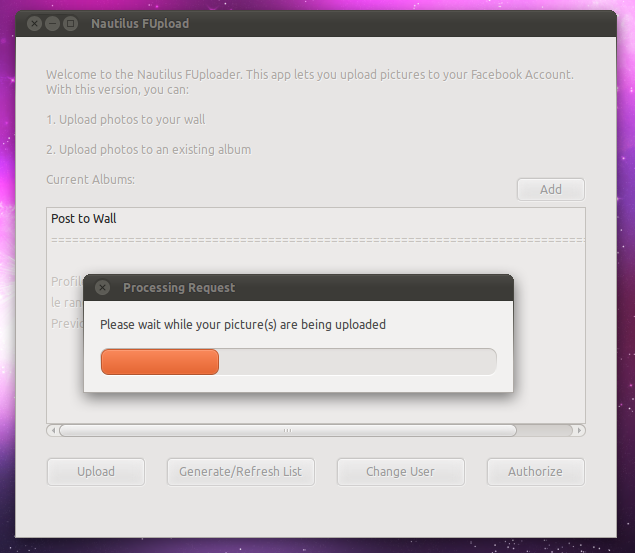
Easily Upload photos to Facebook using Nautilus

So you have one photo you want to upload to Facebook but Shotwell seems over-kill and opening a browser seems too much effort.
Well, take the hassle out of posting images to your Facebook profile with this nifty Nautilus Facebook uploader script.
  • Download the tarball @ gtk-apps.org
  • Extract to somewhere accessible
  • Double click on the ‘install’ script inside and choose ‘Run’ when prompted.
  • You can now right click on a photo and choose ‘Upload to Facebook’ form the scripts menu.

On your first run you will be prompted to ‘authorize’ the application to post photos to your wall/albums, etc.
One done authorize click the ‘Refresh’ button sat along the bottom and choose where you want your photo to be uploaded to. It defaults to posting to your wall.


Once ready hit upload and wait for it to do it’s thing. You’ll then see a confirmation pop-up.

And the image should appear in your desired location. Here’s the image I uploaded using the script posted on my wall.
Source

Intelligent boot splash greeter

Elephants and readers with a good memory may remember an ‘ambient boot splash’ proposal we featured at the end of October.
For those unaware the notion was simple:
"…the idea of an OS that uses the time to greet you appropriately, giving the impression that it cares.”
At the time the idea was just that: an idea but that’s fast changing thanks to Shnatsel – who’s already got a ‘greeter script’ working.
screenshot
“I was really inspired by the ambient boot splash mock-up you covered a while ago and decided to implement it. I’ve already made a script which shows a greeting on boot and a goodbye on shutdown. “
We loved the idea and many of you did. If you feel you could help Shnatsel he’d be most appreciative: -
“I think I know how to implement the rest using the script engine without altering it, but I can’t do it all myself. At least one more coder and a designer are needed to complete this.”
You can see/get/hack on the code at code.launchpad.net/~shnatsel/+junk/plymouth-greeter.
There’s also a PPA with the greeter script available to install, under caution, @ launchpad.net/~shnatsel/+archive/plymouth
“On the technical side, I’m going to tell plymouth what time of day it is via plymouth –update call, and switch the look of the theme accordingly. “Good %timeofday%” message also could be re-implemented as a picture.
But, as I said, I can’t do it all alone.”
Source: http://www.omgubuntu.co.uk/2010/12/intelligent-boot-splash-greeter/

2010-05-21

HOW TO: RUN MACOSX ON WINDOWS

Hey guys, this video will show you how to install VMWare on your windows, and run Mac OS X.


You will need to get utorrent to download the files:
http://www.utorrent.com

1) Download the following files:
http://thepiratebay.org/torrent/51020...
http://thepiratebay.org/torrent/47980...
http://www.megaupload.com/?d=DSBCARGZ

2) Install VMware Workstation and enter your registration info. Once it has fully installed
restart your computer.

3) Unzip the Mac OS X Leopard file you downloaded.

4) Open VMware Workstation 6.5.1 and click on Open Existing VM or Team

5) Now locate the Mac OS X Leopard folder that you unzipped and open Mac OS X Leopard.vmx

6) Simply click on Power on this virtual machine and let Mac OS boot up

Tips

How to change resolutions:

• When OSX is booting, tap F8 to get to the boot prompt
• Type in "Graphics Mode"="1280x1024x32" (with quotations, replacing the resolution with the resolution you want)

Source: http://www.youtube.com/watch?v=D2Qxs_-RX4A

2010-04-26

TeamViewer - the All-In-One Solution for Remote Access and Support over the Internet


TeamViewer connects to any PC or server around the world within a few seconds. You can remote control your partner's PC as if you were sitting right in front of it. Find out why more than 60 million users trust TeamViewer!

Windows Mac Linux iPhone / iPad / Android

Now it supports Linux and iPhone. It's cool. :)
Download:
http://www.teamviewer.com/