2010-12-22

Dark SkyLine - Free Blogger Template

Dark SkyLine is another free blogger template that I have created. The template has a nice navigation menu in the header section, which can easily be customized with your own links. The template can be downloaded for free at TheBlogTemplates.com. If you have any questions on how to implement this blogger template into your blog, please feel free to ask.

Features:

2 Columns, Blue, Fixed Width, Right Sidebar


Screenshot:


Live Demo -  Download This Template

Source

10 Facebook Widgets and Tools for Your Website and Blog


Facebook is the largest social networking site with more than 400 million active users and is growing larger every day! Make sure to use these Facebook widgets to connect with your large Facebook audience through your blog or website. You can use these tools to easily share certain profile information, websites, blogs, and businesses with the Facebook community.


Personal Profile Widgets

Profile Badge
Create a Facebook profile badge to share selected profile information on your website. A profile badge will allow your users to easily connect with you and add you as a friend.

Photo Badge
This photo badge allows you to share your Facebook photos on websites and blogs. Choose from a vertical, horizontal, or two-column layout and also choose the number of photos to be displayed.

Fan Badge
Display your Facebook fan pages for all to see.

Website or Business Widgets

Share Button
A powerful facebook widget which allows your visitors to share your content on Facebook!

Fan Box
Lets your users easily become a fan of your site and also allows them to view your Facebook page stream.

Page Badge
Lets you share your Facebook page (one that you have created) information on your website.

Twitter Link
Connect your Facebook page with Twitter. Whenever you update your Facebook fan page your twitter followers will be updated as well with a tweet.

Developers Widgets

Publishing to Facebook
This allows your users to publish their content and activity to Facebook.

Comments Box
Lets your users comment on your website content with their Facebook account.

Live Stream
Lets Facebook users to post and share content in real-time.


Source

Add Google Buzz Share Button - Widget for Blogger

Google Buzz is a great social tool which is very similiar to Twitter and Facebook. It's a wonderful way to engage and interact with your readers! Make sure to implement these Google Buzz buttons into your blogger posts, so that users can easily share your content on Google Buzz.

Add Google Buzz it Button to Blogger

  1. Go to Layout >Edit HTML in your Blogger Dashboard.
  2. Back up your existing Template before making any changes!
  3. Make sure to check the "Expand Widget Templates" box.
  4. Here is the Google Buzz it Code:
    <div style="float:right;padding:4px;">
    <a expr:href='&quot;http://www.google.com/reader/link?url=&quot; + data:post.url + &quot;&amp;title=&quot; + data:post.title + &quot;&amp;srcTitle=&quot; + data:blog.title+ &quot;&amp;srcURL=&quot; + data:blog.homepageUrl ' rel='nofolloW' style='text-decoration:none;' target='_blank'>
    <img alt='Buzz It' src='http://i48.tinypic.com/idyc04.png' style='border:0px;'/></a>
    </div>
  5. Search for this line of code in your template:
    <div class='post-header-line-1'/>
    and place the Google Buzz it Code right after the code you searched for above.
    If this doesn't work, then search for this code below and place the Google Buzz it Code directly before it.
    <data:post.body/>
  6. Now save your template and you're done!

Add Google Buzz Button with Share Count to Blogger

  1. Here is the Google Buzz it with Share Count Code
    <div style="float:right;padding:4px;"> <script type='text/javascript'> njuice_buzz_url = '<data:post.title/>'; njuice_buzz_title = '<data:post.url/>'; njuice_buzz_share = 'reader'; </script> <script type='text/javascript' src='http://button.njuice.com/buzz.js'/> </div>
  2. Place the Google Buzz it with Share Count Code either
    directly after this:
    <div class='post-header-line-1'/>
    OR
    directly before this:
    <data:post.body/>
  3. To change the style of the widget add either
    njuice_buzz_size = 'small';
    or
    njuice_buzz_size = 'simple';
    just after
    njuice_buzz_share = 'reader';
  4. Save your blogger template and you're done!

Source

Free Blogger Templates

TheBlogTemplates is a website where you can browse and download Free Blogger Templates as well as Free WordPress Themes. The website is run by my friend James Morgan and his partners and they also offer reviews of the Best Web Hosting Plans. You can follow them on twitter: @TheBlogTemplate or join them on Facebook.

Source

Elementary’s new Wingpanel in action


What is nice about Wingpanel is that it saves real-estate without compromising the functionality of the indicators.
I took some time today to fight with libindicators and fix some issues the current wingpanel. It is as a very experimental piece of software. And by no means is it the new panel for elementary.
It is just us playing with ideas. Please join the #elementary channel if you would like to improve development on this piece of art. I will leave you with some screenshots and a video.


Video

You can get the code from lp:wingpanel
THIS IS WORKING CODE
Source

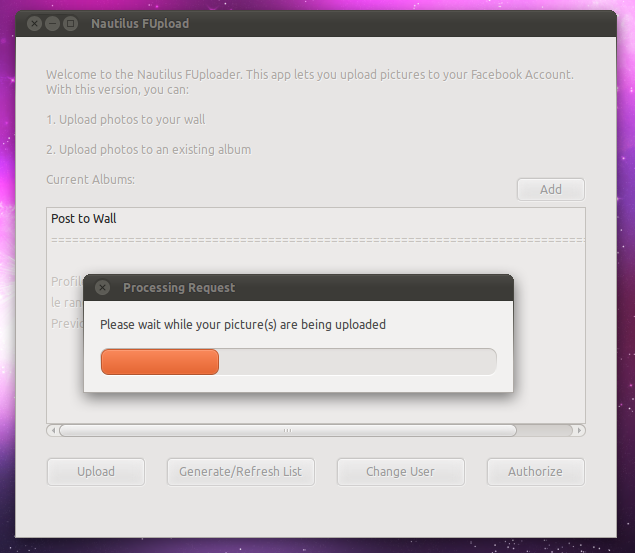
Easily Upload photos to Facebook using Nautilus

So you have one photo you want to upload to Facebook but Shotwell seems over-kill and opening a browser seems too much effort.
Well, take the hassle out of posting images to your Facebook profile with this nifty Nautilus Facebook uploader script.
  • Download the tarball @ gtk-apps.org
  • Extract to somewhere accessible
  • Double click on the ‘install’ script inside and choose ‘Run’ when prompted.
  • You can now right click on a photo and choose ‘Upload to Facebook’ form the scripts menu.

On your first run you will be prompted to ‘authorize’ the application to post photos to your wall/albums, etc.
One done authorize click the ‘Refresh’ button sat along the bottom and choose where you want your photo to be uploaded to. It defaults to posting to your wall.


Once ready hit upload and wait for it to do it’s thing. You’ll then see a confirmation pop-up.

And the image should appear in your desired location. Here’s the image I uploaded using the script posted on my wall.
Source

Intelligent boot splash greeter

Elephants and readers with a good memory may remember an ‘ambient boot splash’ proposal we featured at the end of October.
For those unaware the notion was simple:
"…the idea of an OS that uses the time to greet you appropriately, giving the impression that it cares.”
At the time the idea was just that: an idea but that’s fast changing thanks to Shnatsel – who’s already got a ‘greeter script’ working.

screenshot
“I was really inspired by the ambient boot splash mock-up you covered a while ago and decided to implement it. I’ve already made a script which shows a greeting on boot and a goodbye on shutdown. “
We loved the idea and many of you did. If you feel you could help Shnatsel he’d be most appreciative: -
“I think I know how to implement the rest using the script engine without altering it, but I can’t do it all myself. At least one more coder and a designer are needed to complete this.”
You can see/get/hack on the code at code.launchpad.net/~shnatsel/+junk/plymouth-greeter.
There’s also a PPA with the greeter script available to install, under caution, @ launchpad.net/~shnatsel/+archive/plymouth
“On the technical side, I’m going to tell plymouth what time of day it is via plymouth –update call, and switch the look of the theme accordingly. “Good %timeofday%” message also could be re-implemented as a picture.
But, as I said, I can’t do it all alone.”

Source: http://www.omgubuntu.co.uk/2010/12/intelligent-boot-splash-greeter/

2010-05-21

HOW TO: RUN MACOSX ON WINDOWS

Hey guys, this video will show you how to install VMWare on your windows, and run Mac OS X.


You will need to get utorrent to download the files:
http://www.utorrent.com

1) Download the following files:
http://thepiratebay.org/torrent/51020...
http://thepiratebay.org/torrent/47980...
http://www.megaupload.com/?d=DSBCARGZ

2) Install VMware Workstation and enter your registration info. Once it has fully installed
restart your computer.

3) Unzip the Mac OS X Leopard file you downloaded.

4) Open VMware Workstation 6.5.1 and click on Open Existing VM or Team

5) Now locate the Mac OS X Leopard folder that you unzipped and open Mac OS X Leopard.vmx

6) Simply click on Power on this virtual machine and let Mac OS boot up

Tips

How to change resolutions:

• When OSX is booting, tap F8 to get to the boot prompt
• Type in "Graphics Mode"="1280x1024x32" (with quotations, replacing the resolution with the resolution you want)

Source: http://www.youtube.com/watch?v=D2Qxs_-RX4A

2010-04-26

TeamViewer - the All-In-One Solution for Remote Access and Support over the Internet


TeamViewer connects to any PC or server around the world within a few seconds. You can remote control your partner's PC as if you were sitting right in front of it. Find out why more than 60 million users trust TeamViewer!

Windows Mac Linux iPhone / iPad / Android

Now it supports Linux and iPhone. It's cool. :)
Download:
http://www.teamviewer.com/

Access your Linux Partition (Ext2, Ext3 and Ext4) from Windows in a Dual Boot

If you have a dual-boot system with Windows and Linux, you probably know that Windows and Linux both use different file systems. Windows uses FAT32 and NTFS file systems where as Linux uses ext2, ext3 and ext4 file systems.

You can access Windows partitions from Linux but on the other hand Windows doesn't allow access to Linux partitions.


Many times we might need to access files stored in Linux partitions and we realize that we can't access them from Windows. In this situation we have to reboot our system in Linux to access those files.

Would not it be better if we could access Linux partitions from Windows? Indeed, it would. That's why here I'm sharing FREE tool which allow to access Linux partitions from Windows:

Website:
http://ext2read.sf.net/
Download page:
http://sourceforge.net/projects/ext2read/

2010-02-04

HandBrake great multiplatform, multithreaded video transcoder

Mac Screenshot HandBrake is an open-source, GPL-licensed, multiplatform, multithreaded video transcoder, available for MacOS X, Linux and Windows. Handbrake converts videos, rip DVDs very easily.


Screenshots

Supported Sources:

  • Any DVD-like source: VIDEO_TS folder, DVD image or real DVD (unencrypted--protection methods including CSS are not supported internally and must be handled externally with third-party software and libraries), and some .VOB and .TS files
  • Most any multimedia file it can get libavformat to read and libavcodec to decode.

Outputs:

  • File format: MP4 and MKV
  • Video: MPEG-4, H.264, or Theora
  • Audio: AAC, CoreAudio AAC (OS X Only), MP3, or Vorbis. AC-3 pass-through, DTS pass-thorugh (MKV only)

Misc features:

  • Chapter selection
  • Subtitles
  • Integrated bitrate calculator
  • Picture deinterlacing, cropping and scaling
  • Live Video Preivew


Website: http://handbrake.fr

Need to install Linux software on an offline computer?

Keryx is a portable, cross-platform package manager for APT-based (Ubuntu, Debian) systems. It provides a graphical interface for gathering updates, packages, and dependencies for offline computers. Keryx is free and open source.


Keryx works in Windows, Linux, and Mac

Screenshots